
Scribe and Reedsy Studio: The Version Boundary Between Co-editing Platform and Local Manuscript
Reedsy Studio fits cloud co-editing with a professional editor; Scribe fits author-led long-form and the print pipeline. This piece sets the boundary between the two, the styling gaps on the export path, and why print parameters belong back on the Scribe side.
Scribe and Reedsy Studio: The Version Boundary Between Co-editing Platform and Local Manuscript
Reedsy Studio (formerly Reedsy Book Editor) is a well-known free platform in 2026 for cloud co-editing with a professional editor. Its strengths are clear: a unified web editor, built-in track changes and comments, and seamless integration with the workflow of vetted editors, designers, and copywriters on the Reedsy platform. If your next book runs through “find a professional editor, have them review chapter by chapter in the cloud,” Reedsy Studio offers a smooth collaboration experience.
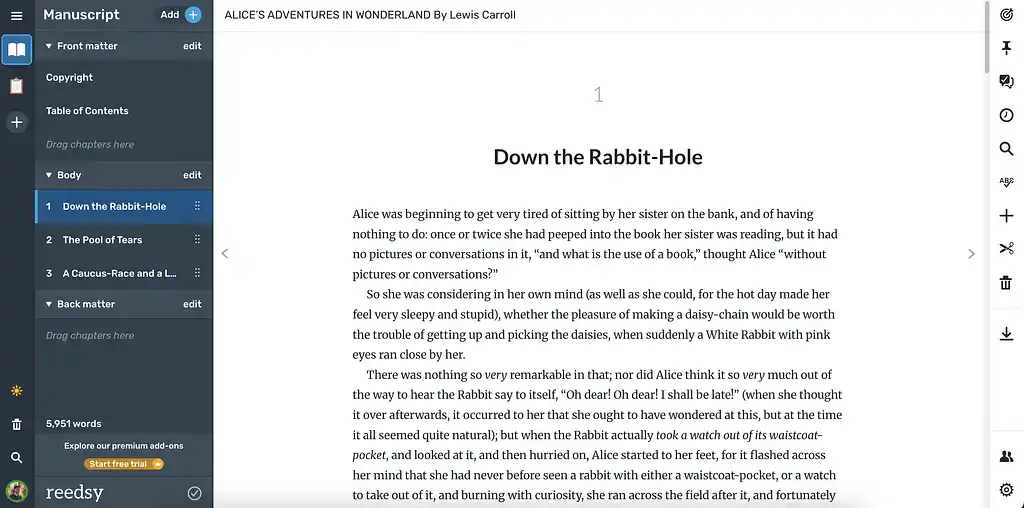
But Reedsy Studio isn’t a full “long-draft to finished book” platform. Its export capability is deliberately restrained — EPUB and PDF both generate, but typesetting options are limited, and the granularity of print parameters (bleed, trim size, ICC, font embedding) is well short of what dedicated typesetting tools offer. Its localization (CJK typesetting, vertical layout, ruby) support is very limited. The manuscript lives in Reedsy’s cloud, so the author’s sense of “where does my file actually sit” is weaker than with a local tool. None of this is a defect — Reedsy Studio has positioned itself as “the interface between author and editor,” not “the author’s home for the whole journey,” and those tradeoffs follow from that.
Catalpas Atelier Scribe isn’t a replacement for Reedsy Studio on this path — it covers the two stages that bracket it: the “solo creation” stage before collaboration begins, and the “print and release prep” stage after collaboration ends. The key concept between the two tools is the version boundary: when does the manuscript’s latest version live on the Scribe side, and when on the Reedsy side, with no overlapping maintenance.

Reedsy Studio’s Strengths and Limits
Strengths — co-editing with an editor genuinely feels smooth. Track changes, comments, version comparison, and conversation bubbles all live in a single unified web interface. Editors don’t bounce between docx files and email. If both you and your editor know the platform, communication overhead is meaningfully lower than the “Word + email” path. An editor working on the Reedsy platform already knows this workflow, so you don’t have to explain how anything works.
Limit one: the export path — Reedsy Studio’s EPUB and PDF go through built-in templates that aren’t highly customizable. That’s enough for most English-language novels, but doesn’t cover manuscripts with special typesetting needs (CJK vertical, bilingual side-by-side, complex footnotes, ruby annotations).
Limit two: print parameters — the bleed, trim size, custom print master, font embedding, and CMYK conversion involved in print-ready PDF are either not configurable or not granular enough inside Reedsy Studio. When you send to KDP Print, IngramSpark, or a local press, that gap has real cost.
Limit three: manuscript ownership — the manuscript lives in Reedsy’s cloud, and what exports is a rendered artifact, not a “project file.” If you want the manuscript to ultimately belong to you and sit on your hard drive, you have to schedule regular exports and local backups yourself.
Once you know these limits, you can judge when to hand the manuscript to Reedsy Studio and when to bring it back.
The Version Boundary: Collaboration Phase vs. Local Phase
Collaboration phase — the stretch during which you and a professional editor are doing content edits or line edits on Reedsy Studio. During this phase, the latest version of the manuscript lives on the Reedsy platform: the editor revises, you accept or reject, both sides leave comments and discuss. Your local Scribe project is demoted to “reference state” — don’t touch it, to avoid version drift on both sides.
Switching back to Scribe — once the content-edit rounds are over and the final text is locked, export the manuscript from the Reedsy platform (usually as .docx or .epub) and manually apply the collaboration-phase text changes to your Scribe project. From that moment on, the manuscript’s latest version is back in Scribe, and the Reedsy project is demoted to “completed.”
Why the explicit handoff matters — every parameter for print-ready PDF (CJK typesetting, font embedding, bleed, trim, master) is more controllable on the Scribe side; EPUB version control and local archiving are also more stable in Scribe. If you let the manuscript live long-term on the Reedsy platform, the “finishing” step is handed off to the limits of the platform’s templates, and you lose real control over pre-print detail.
The switch doesn’t need complex tooling — pull down the final docx or epub, compare against the Scribe project chapter by chapter, and apply the text deltas by hand. The “manual application” sounds tedious, but it’s faster than it looks, because collaboration-phase changes are almost entirely textual (word choice, sentence rhythm, cuts), and applying them is fast and explicit.
Styling Gaps on the Export Path
When you bring the manuscript back from Reedsy Studio to Scribe, a few styling shifts are nearly guaranteed. Knowing them ahead of time saves on-the-fly debugging.
Typesetting parameters don’t travel — the font, line spacing, and paragraph spacing on the Reedsy platform are template-controlled, and after exporting docx they aren’t preserved as a readable “typesetting project.” On the Scribe side, the right move is don’t try to replicate the Reedsy typesetting — let the Scribe project’s typesetting settings take over. Agree with the editor up front: “look at the text only, I’ll handle typesetting on my side.”
Chapter boundaries — Reedsy Studio marks chapters with its built-in “Chapter” block, which becomes Heading 1 on docx export. Scribe recognizes Heading 1, but you should verify once that no chapter has been merged or split (especially for non-standard chapters like a prologue or an extra).
Comments and track changes — these two metadata streams will likely be lost or simplified on export. Before closing the project on the Reedsy platform, manually transcribe any comments worth keeping into a separate note. You don’t need to bring them back into the Scribe project, but you may want to revisit that feedback during later revisions or your next book.
Why Print Parameters Belong Back on the Scribe Side
Once the final text is locked, why should “produce EPUB + print PDF” happen back in Scribe?
First, granularity of print parameters. Bleed, trim size, font embedding, CMYK, ICC — these almost all need item-by-item confirmation when going to press. Scribe (Pro in particular) treats them as long-term parts of the project; Reedsy Studio’s template path is too high-level to tune them individually.
Second, localization and CJK. If your project involves Chinese, Japanese, or Korean, vertical layout, ruby, and line-breaking rules are real problems. Reedsy does well on English-oriented manuscripts but invests less in CJK.
Third, long-term reproducibility. A few years after publication, when you want a revised edition or a hardcover, do you want the manuscript sitting on your drive with a typesetting project that can re-run the PDF any time, or sitting on a third-party platform with no guarantee that platform will still exist N years from now? Reproducibility of local projects is an underrated asset for the independent publisher.
The Version Boundary with an Editor: A One-Liner
Collaboration-phase manuscript lives on Reedsy; pre-print manuscript lives on Scribe; both sides are never maintained simultaneously. That rule is the actual core of this whole workflow. Everything else is detail. Put it as the first line of your workflow document, agree on the handoff point with your editor at the start of each project, and you avoid most version-drift and export-format issues.
Open Scribe to see how it picks up the pre-print stage after a Reedsy edit pass →
You might also want to read
- The Scribe collaboration hub — the entry point for workflows with other writing, note-taking, and review tools
- Scribe and Word: a docx-bridged round-trip review workflow — if your editing chain runs on traditional docx round trips instead of Reedsy