
From the final chapter to the first page
A practical Scroll to Scribe workflow for choosing a manuscript source, checking the handoff, and beginning book production.
“Write a book, then publish it” sounds like two actions. Anyone who has self-published knows how much work hides between them: finding the right version, gathering the chapters, checking for omissions, rebuilding the layout, and repeating the process when proofreading uncovers one more sentence to change.
What happens if you begin adjusting page breaks while the ending is still moving? If every revision creates another supposedly final export? If the ebook and print edition each retain their own manuscript, which one will you trust six months later?
Much of the cost in a self-publishing workflow accumulates neither in writing nor in typesetting, but in the seam between them.
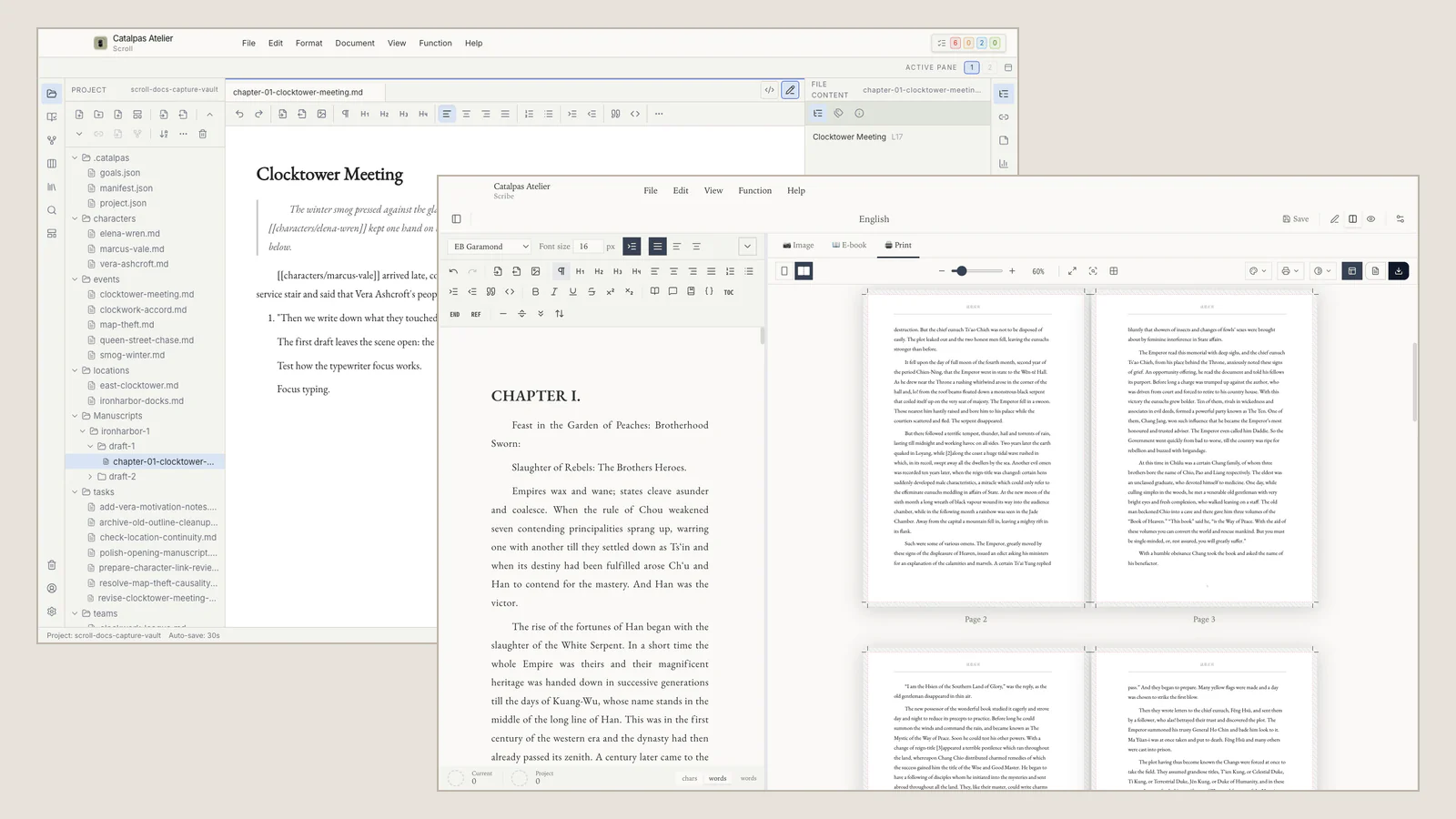
Scroll and Scribe approach that seam through a deliberate professional division. Scroll gives a long work room to change through planning, drafting, and revision, then helps the author prepare an explicit manuscript source for delivery. Scribe begins when that source is mature enough for Appearance, pagination, and publication output. Each desktop application can continue the work around the same local Project folder without pretending that the handoff is automatic.
First: let the work change without losing its direction
Long-form writing rarely follows the first outline in a straight line. A secondary character claims more space. A Timeline exposes a contradiction. One research source changes the argument of an entire chapter. The writer needs an environment that permits change, not a layout file that asks the book to look finished too soon.
In Scroll, the manuscript and its creative context remain close: characters and places, Story data, Timeline, relationships, research, revision tasks, and the chapters being written today. Different Story views can help the author inspect different questions without turning each view into another independent container for the novel.
For an independent author, that sense of a Project matters as much as a growing word count. A traditional publishing team may distribute version tracking, editorial notes, and production planning across several people. A self-publishing author often carries all of them. Scroll keeps that work near the prose while letting page design wait until the manuscript has earned the transition.
Next: make “final” a decision you can explain
As a book approaches completion, filenames often lose meaning first: editor review, author revision, final, final two. They record emotion more reliably than publication intent.
Scroll’s Works, Manuscript versions, and Publish Version let the author state which work and which manuscript source are intended for this edition. Older endings, cut chapters, and alternate versions can remain part of the creative history without presenting themselves as the current publication source.
These records do not freeze the prose, create Git snapshots, or upload a copy. Their value is contextual: “What are we publishing this time?” no longer depends on memory alone. That becomes especially useful for a corrected edition, a later reprint, or a translation whose source must still be identifiable months from now.
Before the handoff, save the current work and back up the whole Project folder. Local-first files remain subject to device failure, accidental deletion, and sync conflicts. If you use a cloud-sync folder, resolving conflicts and retaining recoverable copies remains your responsibility.
Prepare the delivery in Scroll
Scroll’s Delivery Center, Delivery readiness, and Resolved source belong to the delivery-preparation stage. They help the author inspect whether the selected work, source, and Project state express the intended book.
Delivery readiness is not proof that Scribe has received or recognized anything. It is a preparation signal inside Scroll. The author still checks the other side of the boundary.
This modest connection avoids manufacturing an extra manuscript merely for transport. It also avoids promising “automatic publication.” Scroll does not directly create a finished PDF, EPUB, or print layout, and it does not make a Scribe Appearance. It prepares a source and keeps the creative context upstream.
Verify the handoff in Scribe
When Scribe opens the Project, pause before choosing fonts or adjusting chapter openings. Check the recognized work and Publish Version, the source folder, the chapter count and order, and the manuscript version. If Scribe has recognized something unexpected, return to the source decision rather than designing around the wrong manuscript.
Only after that verification does the writer’s attention move from story structure to book structure. In Scribe, the useful questions are different: How should chapters begin? Does the page rhythm support the prose? Does the table of contents reflect the intended hierarchy? Which supported publication output does this edition need?
This timing gives Appearance and pagination work a more stable foundation. Scribe can handle the book-production phase while Scroll retains the upstream Story data, research, tasks, and version context.
If proofreading reveals a missing word, the author still decides where the authoritative text will be corrected and then repeats the relevant checks. The workflow does not remove that responsibility. It removes some of the ambiguity that arises when several files all claim to be final.
A mystery novel moving through the boundary
Imagine an author completing a mystery built around three interlocking chronologies. For the first three months, her urgent questions concern testimony, character knowledge, and the tasks remaining in structural revision. Scroll’s Story data, Timeline, relationships, and tasks keep those questions connected to the prose. Choosing a chapter-title font would not help her yet.
After editorial revision, she keeps the editor-reviewed manuscript for context and selects the author-revised manuscript as this edition’s Publish Version. In the Delivery Center, she checks the Resolved source and Delivery readiness against the book she intends to make.
In Scribe, she confirms the recognized work and Publish Version, source folder, chapter count and order, and manuscript version. Then she turns to Appearance, chapter openings, pagination, and output. When a late proof correction occurs, she knows which source carries authority and which checks must be repeated.
That is a credible meaning of a smooth workflow: not the absence of a handoff, but a handoff that does not require the author to reconstruct the book.
Who benefits from the complete path?
Writers still discovering the story or making large structural revisions may use Scroll on its own. Authors who already have a stable manuscript and mainly need page design and publication output may begin with Scribe.
The combined path is most relevant to authors who value deep long-form planning and also expect to produce their own ebook or print edition. The two applications can be used separately; the Writing Suite is an option for authors who need both stages.
To decide whether your current manuscript has reached the boundary, continue with five signs your manuscript is ready for Scribe. For the larger division of work, return to the Scroll and Scribe workflow hub. Exact current handoff steps belong in the public integration guide.
The useful question is not whether every author needs two applications. It is whether your book would benefit from letting creative work remain flexible until a clearly chosen source is ready for page work.