
Notion lets everyone see the outline. Where does the formal manuscript live?
Notion uses database views, comments, and permissions to give a team one creative map. When the work becomes a book-length manuscript with versions and a publishing handoff, see how Scroll provides a focused local Project for the author and a clear path to Scribe.
Early in a co-written novel, the scarce resource is often not quiet but shared visibility. Who is completing the character records? Has the third-act outline been approved? Where are the research links, and who is responsible for the editor’s notes? If that information moves only between one person’s computer and several chat threads, the team soon loses its common map.
Notion is very good at putting that map in front of everyone. Docs, wikis, projects, and databases can live in one connected workspace. Every database item is also a page with dates, status, relations, and other Properties. The same records can appear as Table, List, Board, Calendar, Timeline, Chart, or Gallery and serve different participants through filters, sorting, groups, and linked views.
That generality is powerful for co-authors, editors, researchers, and marketing collaborators. An editor can see chapter status by review round. A researcher can see sources waiting to be checked. The lead writer can isolate the decisions due this week. Comments and permissions keep discussion near the relevant material. The team does not have to guess which attachment contains the current table or maintain a completely separate copy for every role.
Solo writers can benefit from that freedom too. A mature template can organize characters, locations, plot, tasks, and schedule. People who enjoy database design can make fields and views fit their method closely. Notion’s current Offline Mode can download eligible pages under its present rules, and content export can preserve portable copies. Both broaden access and backup choices; neither turns an entire workspace into a normal local Markdown Project whose files and complete structure the writer directly manages.
Once the outline is approved and collaborative decisions settle, the work enters a different kind of labor. One author may spend months producing a book-length manuscript, maintaining voice and rhythm across chapters, then selecting a formal version for editing, proofreading, and layout. Pages, Blocks, and database items remain flexible. The author begins to ask a different set of questions.
Can opening the work lead directly into continuous long-form prose? Do characters, events, and revision Tasks already speak the language of a writer, without first designing a general database? Are source files directly managed from the beginning of daily writing? Near publication, can the author identify the exact chapters and version that will enter book production?
A general workspace can remain excellent at shared planning without requiring the long manuscript to take the same form. Collaborative information needs visibility. Formal writing needs continuity, focus, and a clear work boundary. Both needs are legitimate; they occur at different stages.
These are the later-stage needs Scroll is designed to receive. It serves fiction, nonfiction, and complex long-form work by keeping Markdown manuscripts, Story data, research, author Tasks, works, and manuscript versions in a normal local Project. Opening the work leads into an environment shaped around writing a book.
A formal manuscript needs another kind of continuity
Long-form writing has a continuity that no status field fully describes. One altered sentence of setup may affect the payoff eight chapters later. If the writer loses a character’s voice, she may need to reread several thousand words before it returns. Chapters are useful boundaries, but the author still needs to read across them, search them, and revise them as one work.
Scroll provides a dedicated long-form editor for that practice. Chapters remain inside the local Project. Visual Mode keeps writing and reading close to the rendered text; Source view exposes the same Markdown when direct markup and file content matter. The author can focus on prose and inspect the source without maintaining two manuscripts.
Black House, line focus, goals, and typewriter mode protect a writing interval. They do not pretend that the Project’s complexity has disappeared. Character records, research, and Tasks simply move into the background for an hour. The writer can trust that the context remains in the work and give attention to the present scene.
Local source files also clarify formal authority from the first day. The Project lives in a location chosen by the author. A complete copy can participate in an external-drive routine, system backup, or suitable cloud-backed folder. Local-first does not guarantee safety; it gives the writer direct responsibility for the working Project and its copies.
Author planning can use author meanings
Novel planning also uses tables, boards, calendars, and timelines. Shared view names do not mean that every view answers the same question. “The fall of the capital” is an event inside a story. “Rewrite chapter two after the fall of the capital” is author work. A relationship between a character and an organization is different from the person assigned to a production task.
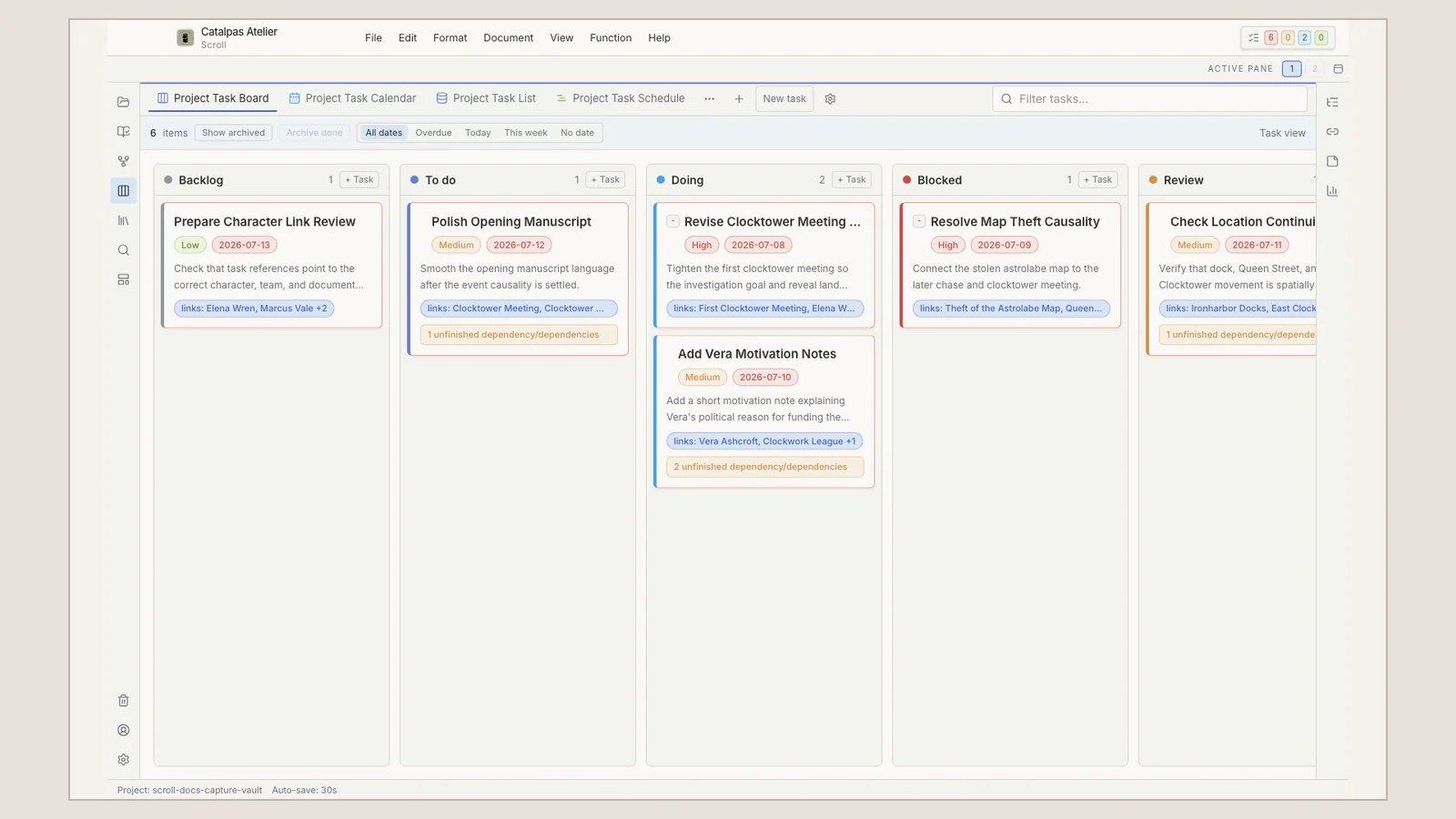
Scroll provides built-in Story meanings for characters, locations, organizations, and events. The same Story data can appear through Spreadsheet, Gallery, Calendar, Timeline, Subway, Relationship graph, Map, and canvases. Tasks have a separate List, Board, Calendar, and Schedule. The Project can therefore answer “What happens in the Story?” and “What should the author do next?” without asking one generic database to carry both authorities.
The built-in structure is not a story formula. A mystery may center dates, relationships, and fields the author explicitly uses to record knowledge. A memoir may depend more on locations, research, and chapter Tasks. Custom Project modeling can extend what the work actually needs without requiring every book to complete every possible field.
Imagine a team that has agreed on the outline for a historical mystery and now needs one lead writer to unify the voice. During drafting, she can check case chronology on Timeline, inspect relationships the author has explicitly recorded, turn editorial notes into defined revision passes, and return to the manuscript to verify who learns what and when. Decisions from the collaborative stage gain an explicit home while the formal manuscript grows around one Project.
“Done” still has to name a version
When a long work enters editing, proofreading, and layout, a Done status is not enough. Which chapters are included? Are removed chapters retained? How does the editor’s review copy relate to the writer’s current changes? Where should a future edition begin?
When the editor asks, “Which manuscript are we producing?”, the author needs a more dependable answer than final-final-3. Scroll keeps work and manuscript version decisions beside the source text and preserves a clearer point of return for later revision.
That boundary matters especially in self-publishing. Without a publisher’s production desk collecting and reconciling files, the author’s system must state what the stable content is. Tasks can close the final revision pass. Version records identify this production source. The complete Project retains context for an updated edition.
Let long-form writing continue into book production
After the manuscript stabilizes, the work begins to need book Appearance, pagination, contents pages, running heads, and publication files. Scroll hands those responsibilities to Scribe. Scroll protects changing ideas, Story planning, and prose; Scribe handles how a stable manuscript becomes the pages of a book.
The division lets the lead writer avoid typesetting while drafting and reduces the reconstruction required at the production boundary. Scroll does not produce the finished PDF, EPUB, or print layout, and a ready state is not confirmation that Scribe has received the manuscript. The author still selects the scope and reviews recognized works, versions, chapters, and pages in Scribe.
Continue with the Scroll to Scribe workflow for the full boundary. If the formal manuscript remains in a collaborative workspace, Notion outlines and Scribe follows that publishing intent. The two articles serve writing upstream and production downstream; neither insists that a creative workflow can have only one valid arrangement.
Give shared planning and formal writing clear places
A work changes its collaboration density on the way from idea to publication. Early on, records need to be visible, opinions need to be captured, and status needs to be shared. During sustained manuscript writing, the author needs continuous prose, local source authority, Story planning, revision Tasks, and version boundaries. Naming those stages makes each tool’s responsibility easier to see.
Scroll gives the formal-writing stage an author-specific local Project. The manuscript remains continuous. Story data does not have to be rebuilt from generic components. Tasks and versions have separate roles. A stable source can continue into Scribe for book production.
The Scroll comparison guide offers more routes through planning, writing, and publishing stages. If your work has moved from “everyone can see the outline” to “one writer must sustain the formal manuscript,” visit the Scroll product page to see local long-form editing, Story planning, Tasks, and versions. Clarify the stage first, and the role of each tool becomes much clearer.