
Visual Mode or Source view? Keep flow and Markdown control
Write on a formatted surface, inspect Markdown and YAML directly, and understand the save and backup boundaries around one manuscript.
Authors who know Markdown often value the certainty of source. The hash before a heading, the destination of a link, and the fields in YAML frontmatter are visible. If the file leaves the current application, a general text editor can still open it.
At three thousand words, however, markup begins to occupy some of the attention meant for prose. The author wants to hear the rhythm of a paragraph and keeps seeing emphasis marks, link syntax, and long URLs. A formatted editor solves the reading problem but can create a different unease: What did the interface just change? Is the source structure still there?
This is often framed as a permanent choice. Accept the control of pure source, or accept the ease of formatted editing. A more useful question is smaller: Which posture helps with the task in front of you?
In Scroll, Source view and Visual Mode edit the same prose. They are not two documents, and they are not versions being synchronized in the background. The presentation and editing surface changes. The source remains one document. That is why ease and control can coexist—and why saving and checking still matter.
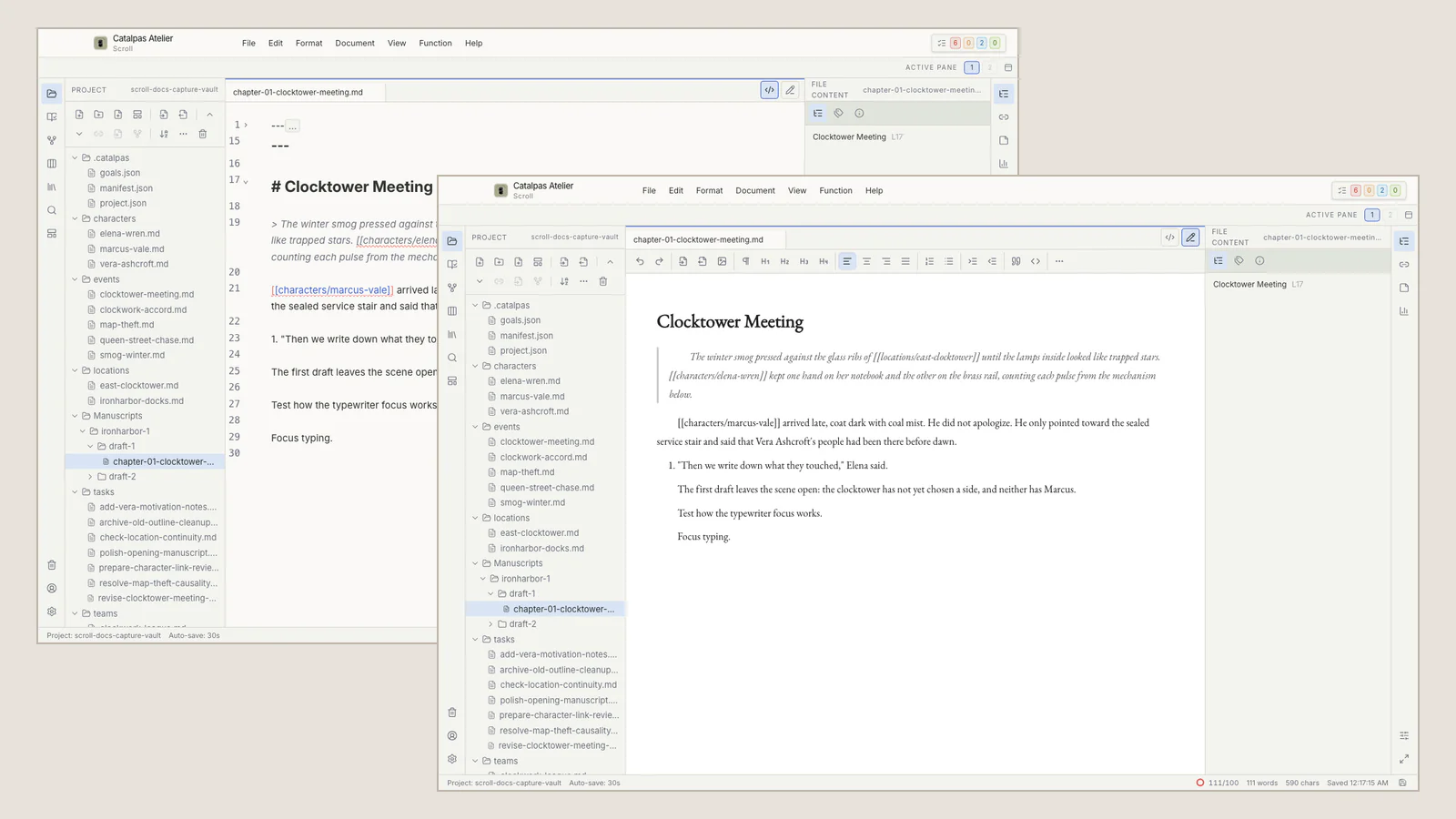
Visual Mode: let formatting recede behind reading
During continuous drafting, the author is deciding about words, sentences, paragraphs, and scenes. A heading should read as a heading. A quotation, list, or supported link should appear in a form that does not demand constant interpretation of delimiters. Visual Mode reduces the amount of markup competing with sentence rhythm.
The Markdown has not disappeared. The same text remains the source; common structures do not need to occupy the visual foreground during every language decision. For writers who do not wish to memorize a full syntax before beginning, this provides a more familiar entrance. For experienced source writers, it can be a temporary reduction in structural noise while revising voice and pace.
“Visual” needs a precise boundary. Visual Mode is formatted writing and reading inside the editor. It is not a paginated book preview. Heading size, text width, and color on screen do not create a Scribe Appearance, predict a PDF, or tell the author how many printed pages the manuscript will occupy. Trim size, fonts, styles, spacing, and pagination belong to the downstream book-production stage.
Visual Mode is therefore well suited to drafting a scene, reading paragraph transitions, refining dialogue rhythm, and working with supported headings, lists, quotations, and links. The central question is how the passage reads—not how every source marker is arranged.
Source view: bring the structure forward when it matters
Source view exposes Markdown, YAML frontmatter, and other supported text directly. It is useful when:
- formatting behaves unexpectedly in Visual Mode and the original marks need inspection;
- material has come from another tool and headings, lists, or links need review;
- the author needs to edit a frontmatter field they understand;
- the file will be used with another text tool and its current source state should be confirmed;
- unfamiliar or incompletely rendered markup needs to be preserved and investigated.
Pure source is not inherently more professional. It places structural judgment in the foreground. Authors who read comfortably through markup can remain in Source view for much of their work. There is no duty to adopt formatted editing because it looks newer. Likewise, a writer who prefers Visual Mode does not need to master every Markdown construction before drafting prose.
When unfamiliar markup appears, do not delete it because the visual rendering seems acceptable. Do not assume that every Markdown extension can be fully understood and preserved by any editor. Return to Source view, identify what the structure is for, and then decide whether it should be edited. Control is not constant exposure to symbols. It is access to the evidence when a structural decision must be made.
How one chapter can move between the two modes
Imagine an author writing a historical nonfiction chapter about an old port. In the first pass, she drafts in Visual Mode. Headings, quotations, and links appear in readable form, while her attention remains on narrative rhythm and the way sources enter the paragraph. Missing dates receive a consistent placeholder to investigate after the section is complete.
When the chapter has shape, she saves and switches to Source view. She checks heading hierarchy, indentation in the source list, link destinations, and the frontmatter fields she owns. Unfamiliar markup remains in place until its purpose is understood. Saving before a mode change, a bulk restructure, or an external edit gives the next inspection a known starting state.
For a precise search with an external text tool, she saves again and stops editing the file in Scroll before the other program reads it. After the external change, she returns to Scroll, checks the result, and reads the passage again in Visual Mode. Preventing two applications from holding unsaved changes to the same file matters more than switching frequently.
No chapter must follow a ritual of two complete passes. Some prose may remain in Visual Mode. Technical notes may be clearer in Source view from beginning to end. Two modes provide a choice of posture, not another workflow to maintain.
Portability is more than saying “the file is local”
Readable Markdown makes prose easier to open, copy, and move with general text tools. A Scroll Project lives in a folder the author chooses. When creating a backup, close Scroll and copy the complete Project folder with a trusted local backup tool. An off-device copy can be stored using a service the author chooses.
Readable prose does not mean that the Project’s entire meaning lives in one Markdown chapter. A long-form Project may also contain character and location cards, events, relationships, tasks, settings, saved views, and supported advanced content. Another text editor may read the prose without understanding all of that Project context.
For that reason, a complete backup covers the whole Project, not merely the chapter currently open. Portability has two different goals. If the goal is readable prose, ordinary text files are valuable on their own. If the goal is preserving Scroll’s Project context, keep the complete folder and verify what the receiving environment recognizes.
Local and readable files provide control and options. They do not promise that another application will understand every supported structure without loss. A user-chosen sync service can store a backup copy; that does not turn Scroll into a hosted synchronization service or remove the need for more than one recoverable copy.
When the real question changes from “How should I edit this prose?” to “How should these pages, the table of contents, PDF, or EPUB be produced?”, the work has reached the Scroll-to-Scribe boundary. Scroll prepares an authoritative manuscript source. Scribe still needs to receive and recognize it, and the author still needs to inspect the pages and outputs.
Choose by task rather than identity
The choice can be reduced to three sentences:
- When you are writing sentences, reading paragraphs, and shaping rhythm, use Visual Mode.
- When you are inspecting markup, checking structure, or handling unfamiliar content, use Source view.
- When another tool must touch the file, save first, then check the source before and after the external change.
The Editor workbench guide documents the current mode boundaries. Continue to Black House Is More Than a Hidden Interface when the problem is visual distraction, or return to the Long-Form Writing Guide to choose a different path through the Project.
Ease and control are not opposite ends of one line. Control does not require seeing every mark at every moment. Ease does not require giving up access to the source. Both can belong to the same document, taking the foreground when the author’s current task calls for them.