
Vellum vs Catalpas Atelier Scribe: From Mac-Only to Cross-Platform and CJK
Vellum makes elegant, simple e-books and printed books for Mac users; Scribe carries the same simplicity to Windows and Linux, and adds CJK and CMYK.
Vellum vs Catalpas Atelier Scribe: From Mac-Only to Cross-Platform and CJK
For the past decade, the advice indie authors have heard most often is, “Buy a Mac, then buy Vellum, and your book will instantly look great.” The reason that line spread so widely is that for a long time it was, in fact, true. Vellum redefined “authors doing their own layout” in a near-minimalist way—you drag in the finished manuscript, pick a Style, click export, and the resulting e-book and paperback can sit side by side with traditionally published titles.
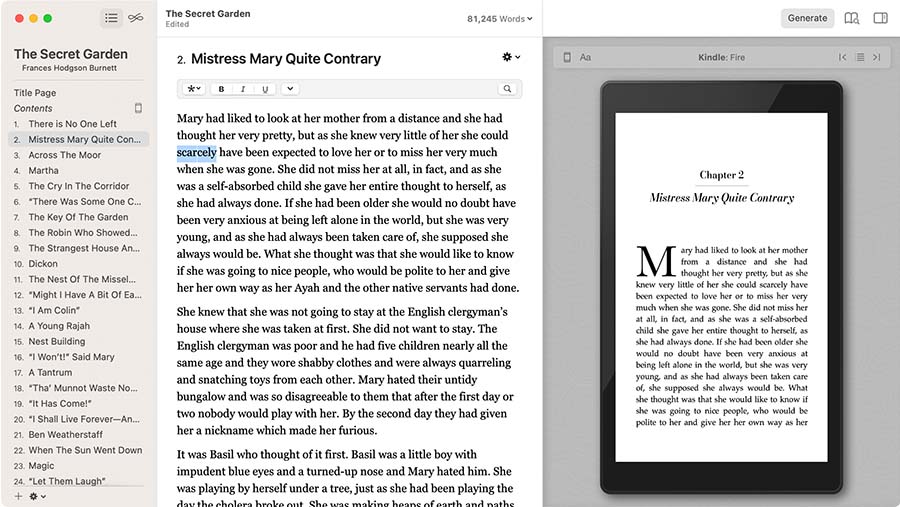
That is not hyperbole. Vellum’s near-cult status in English indie publishing comes from its restraint about design details and its respect for the author’s attention. It does not give you a thousand knobs—just a thoughtfully considered set of presets, letting you put the saved energy back into writing itself. Over many years, novels laid out in Vellum—whether shipped on KDP or IngramSpark—have a recognizable polish.
But Vellum also has a few hard limits. What if you don’t work on a Mac? What if you want to see the layout updating in real time as you write, instead of importing it for layout after the draft is done? What if your novel is in Chinese or Japanese, needing vertical text, or kana annotations neatly placed above kanji? What if you plan to send an illustrated hardcover to a commercial printer and need precise CMYK color control?
These are the questions Catalpas Atelier Scribe sets out to answer. It does not propose to take Vellum’s place in the hearts of English-language Mac users—that is the result of years of work. What it aims to do is extend the “author-friendly elegant layout” that Vellum represents to the platforms, languages, and print scenarios Vellum has yet to cover.
This article moves across four dimensions—platform and data ownership, professional print capability, the coupling between writing and layout, and pricing—to help you judge which tool fits your project. We will not try to prove which is “better,” because the design philosophies of these two tools do not sit on the same axis.
Platform and Data Ownership: macOS-Exclusive vs Three-Platform Desktop
Vellum is a macOS-exclusive desktop application. This is not an accidental technical choice but part of its product philosophy—compress functionality into the subset Apple’s ecosystem handles best, so all resources go into perfecting the macOS experience. That trade-off brings obvious benefits: the interface aligns closely with the system, performance is stable, and the update cadence is unhurried.
But it also means a rigid boundary. If you use Windows, if your writing laptop is Linux, if Mac is only a backup in your work environment—Vellum is not on your option list. That limit forces a significant share of authors into a choice: get a Mac just for Vellum, or look for an alternative elsewhere.
Catalpas Atelier Scribe took another path: one desktop application that installs on Windows, macOS, and Linux, with the same tiers and cross-platform-compatible file formats on all three. You can draft on a company-issued Windows laptop, continue editing at home on a Mac, and finish print export on a Linux workstation—no format conversion at any point.
On data ownership, the two tools are in a similar camp: Vellum keeps files on your local Mac, and Scribe also defaults to storing files on your local device. The practical difference is in the file form: a Scribe project is plain Markdown in any folder, so if you want sync you point that folder at a cloud drive yourself — a convention outside the app, not a built-in feature. Either way, data sovereignty stays with the files on your machine.
The meaning of this distinction varies. If your whole workflow is deeply rooted in the Apple ecosystem, the platform limit may not be a problem at all. But if your device combination is mixed, or you foresee switching your primary machine someday, cross-platform stops being a nice-to-have and becomes the infrastructure on which workflow continuity depends.
Professional Print: From Grayscale Interior to Color Print and CJK
If you write English novels and mainly run the standard KDP and IngramSpark print path, Vellum is just about the least worrisome tool on the road. The print PDFs it generates show respect for traditional print on binding, text frame, tracking, and chapter opening pages; its e-books render consistently and tastefully on Kindle and Apple Books. Many enduring indie classics were laid out in Vellum, which is itself the strongest endorsement.
But Vellum’s print presets are mainly built for grayscale interior scenarios—the mainstream of the English novel market, but not all of it. When you look at image-heavy projects—photography books, art books, picture books for children, illustrated novels, color hardcover collectors’ editions—print needs change qualitatively. These projects demand CMYK color space, ICC color profiles, and precise control of bleed and facing pages. Scribe Pro fills in support at this layer: CMYK export, ICC profiles, custom print masters (facing-page setup, binding-side toggle, bleed range toggle), plus custom page templates and full-page image backgrounds.
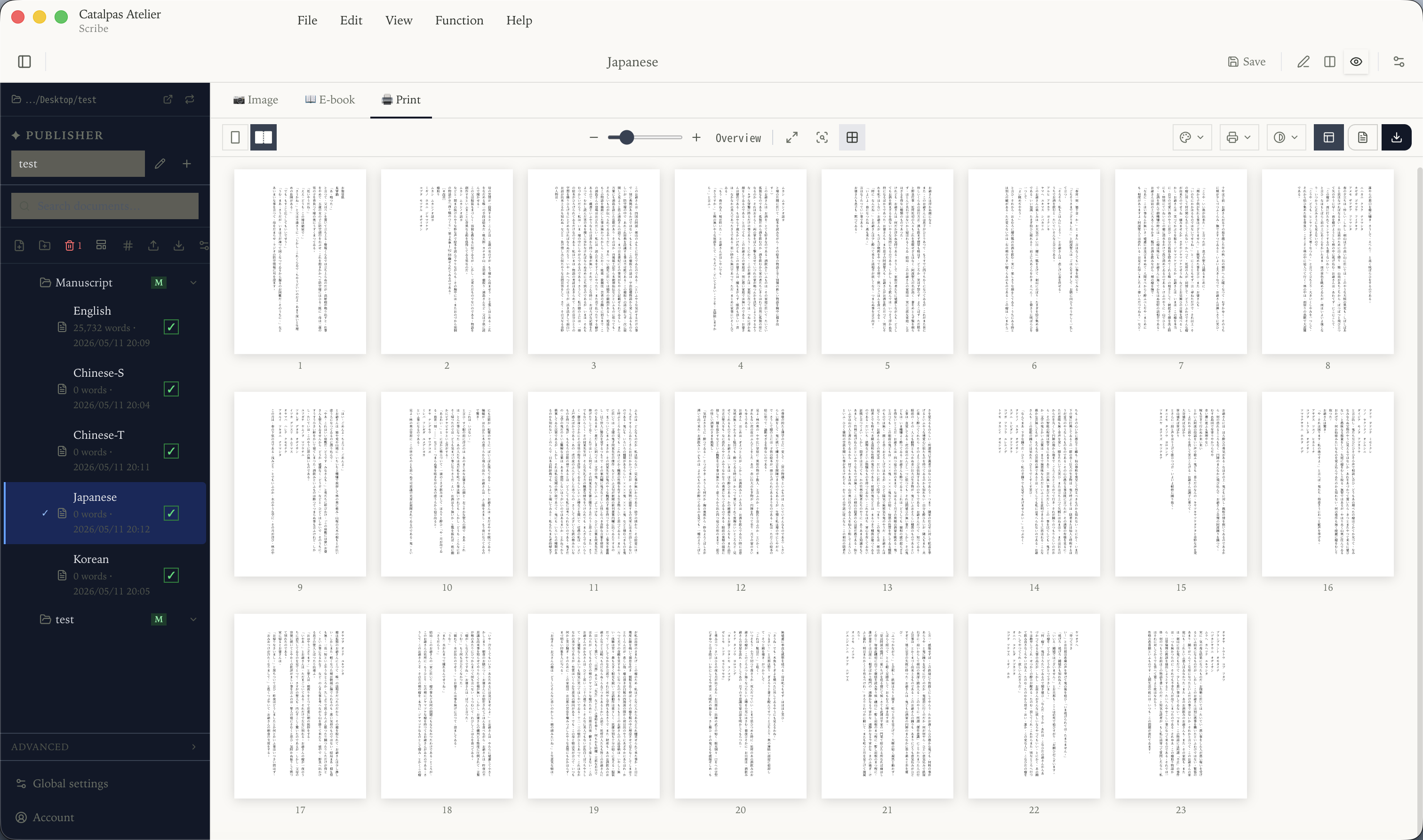
The more striking gap is in CJK typesetting. To many English-language readers this is an invisible domain, but it underpins most everyday East Asian publishing. Vertical layouts common in Chinese and Japanese novels, furigana in Japanese textbooks, pinyin and bopomofo in Chinese classical works—these are structural language requirements, not decorative extras. Vellum does not cover this area, which is not an oversight but a consequence of its positioning; its resources have gone where the English indie publishing market needs them most.
Scribe supports CJK vertical typesetting across all tiers; Pro additionally provides Ruby annotation (pinyin, furigana, bopomofo) across e-book, image, and print PDF export formats (DOCX export keeps the base text and drops the annotations). For authors creating in CJK languages, whether such support exists directly determines whether a tool makes the shortlist.
This is not a criticism of Vellum but a description of the two tools’ coverage. One has been perfected for the English Mac market, the other tries to extend the same quality of layout to broader platforms and language scenarios. Their problem domains do not fully overlap, and it would be wrong to simply rank them.
Coupling Between Writing and Layout: Write First, Then Lay Out, or Write and Lay Out Together
Vellum’s design philosophy keeps writing and layout clearly separate. It assumes you have already finished writing in another tool—Scrivener, Ulysses, Word—and that you then import the finished manuscript into Vellum for layout. There is clarity to this division: while writing, you are not interrupted by layout; while laying out, you are not pulled back into language detail. Each task has its undivided attention.
But that separation introduces a feedback delay. While writing outside Vellum, you don’t see what the final page looks like. You think a chapter is long enough, only to find after import that it takes up just a page and a half on the page; the dialogue rhythm you carefully tuned is scattered by pagination in the print version. Revisions go back to the writing tool, then through import again. The loop is not painful but it is real.
Scribe takes an integrated path. It supports Markdown natively, with text editing on the left and a live preview of the laid-out page on the right—every keystroke reflects in the layout view instantly. That live feedback makes “write and lay out together” possible: when you write a passage of dialogue, you can immediately see its breathing rhythm on the page; when you adjust a chapter heading, the layout of the whole book reflows.
For some authors that immediacy is a creative aid. You sense what the reader will experience when they turn to that page while you’re writing, and that sense feeds back into your prose rhythm and paragraph composition. For other authors, that instant feedback is a distraction—they would rather keep writing and layout entirely separate, looking only at the text while writing.
Neither workflow is absolutely better; what matters is which one suits you. Vellum’s separated workflow fits creators who “finish the story first, then think about how it looks”; Scribe’s integrated workflow fits creators who “need to sense the final page while writing.” This is a matter of preference, not capability.
It is worth mentioning that Scribe also integrates reference management and LaTeX math support on top of the writing environment—both rooted in academic and technical writing traditions, potentially useful for historical novels, hardcore sci-fi works, or nonfiction authors. Vellum, focused on pure literature and general nonfiction, does not cover these scenarios; this is a difference of trade-offs, not better or worse.
Pricing: One-Time Purchase vs Subscription Plus a Free Tier
Vellum uses a one-time-purchase model, packaged by purpose (e-book-only vs. e-book + print; current prices on Vellum’s site). Pay once and use the current version for life. The appeal of this model is predictability: you know the total cost and there are no follow-up bills. For authors who have already settled on the Vellum workflow and publish only one or two books a year, the long view is very economical.
Catalpas Atelier Scribe uses a tiered subscription model with a functional free tier. The Free tier covers writing and layout editing end to end — basic Markdown, CJK vertical layout, and watermarked image export are enough to finish the manuscript; the final EPUB, DOCX, and grayscale/RGB PDF exports start at Plus; Pro provides the full professional set—CMYK, ICC, custom print masters, ruby annotation, references, LaTeX, and more. Pro is currently US$79.99/year at early-bird pricing, with a regular price of US$129.99/year.
The two models serve different logics. Vellum’s one-time purchase means a higher one-time upfront cost but no recurring bill — the longer you use it, the lower the effective per-year cost. Scribe’s subscription keeps the entry barrier extremely low (Free start), but continued use means continued payment—the upside being continuous updates and new features for as long as the subscription is active.
Multi-year cost math depends on which plan you would actually buy and on competitor price changes over that window, so this piece doesn’t amortize totals — check current numbers on Vellum’s site. Qualitatively the two land close over multi-year use, and Scribe is clearly cheaper over a short horizon because you can start at Free. The structural difference is stable regardless: Vellum covers the layout stretch after the manuscript is written elsewhere, while Scribe’s subscription covers the pipeline from writing to print.
The right choice depends on your expected use horizon, your preference between a one-time large payment and small recurring payments, and whether you want to validate the tool’s fit from a Free tier first.
How to Choose
The two tools actually share a fair amount of philosophy—both try to take the complexity of professional layout out of the author’s hands, so that “publish your own book” becomes something one can complete without specialist design training. Their divergence is not about aesthetics or quality but about coverage.
Vellum may be the better fit if:
- You’ve been working in the macOS ecosystem for a long time and have no cross-platform needs
- You mainly publish English novels or general nonfiction through standard grayscale interior print
- You’re used to finishing the manuscript in a writing tool first and then laying it out in a dedicated tool
- You prefer one-time purchase and dislike recurring subscriptions
- You value the preset aesthetics and stable version experience Vellum has built up over the years
Catalpas Atelier Scribe may be the better fit if:
- Your device combination is mixed (Win / Mac / Linux) and you need to continue work seamlessly across platforms
- You create in CJK languages and need vertical typesetting or ruby annotation
- Your project involves color print, hardcover, or commercial offset, and needs CMYK and ICC color management
- You want to see layout updating in real time while writing, shortening the writing-layout feedback loop to zero
- You need built-in support for reference management or LaTeX math
- You want to start from the Free tier and confirm the tool fits your workflow before upgrading
Vellum has established its own standard in English-language Mac self-publishing, built on more than a decade of product refinement and community accumulation; that standard should not be lightly dismissed by any newcomer. Scribe’s goal is not to replace it—it is to offer an option in a similar spirit where Vellum chose not to enter: equally restrained in design, equally author-centric, equally hopeful that “making a beautiful book” should not be a privilege of the few—only this time extending those ideas to more platforms and more languages.
The best tool is not the one with the strongest spec sheet but the one that fits your project. If you happen to write English novels on macOS, Vellum is worth trying first; if your project crosses some boundary of platform, language, or print scenario, Scribe is worth a serious look. Start from the Free tier, lay out a few chapters, and see whether it slips into your rhythm.
Further reading:
- Atticus vs Catalpas Atelier Scribe: Web-Native vs Local-First
- Scrivener vs Catalpas Atelier Scribe: The Novelist’s Manuscript Management and Print Pipeline
- One Source, Both EPUB and Print PDF: A Single-File Workflow for Indie Authors
- The Scribe Comparison Hub: Side by Side With the Tools You Already Use
Try the same workflow in Scribe — start Free, Pro early-bird pricing locked for a limited time →