
Scrivener vs Catalpas Atelier Scribe: The Novelist's Manuscript Management and Print Pipeline
Scrivener redefined the way long-form novels manage their source material; Scribe carries the same manuscript all the way to print and CJK typesetting.
Scrivener vs Catalpas Atelier Scribe: From Source Material Management to Print and Cross-Language
Nearly every author who has ever written a long-form work has heard of Scrivener. Over twenty years it has more or less defined what “long-form novel writing software” should look like—breaking a book into draggable chapter cards, keeping characters, locations, and research material inside the same project file, letting the author switch perspectives and rearrange structure at any time. Scrivener became the working platform of a generation of novelists because it truly understood the messy nature of long-form creation—stories aren’t written in linear order, inspiration doesn’t arrive by chapter number, and software should make room for that nonlinear thinking.
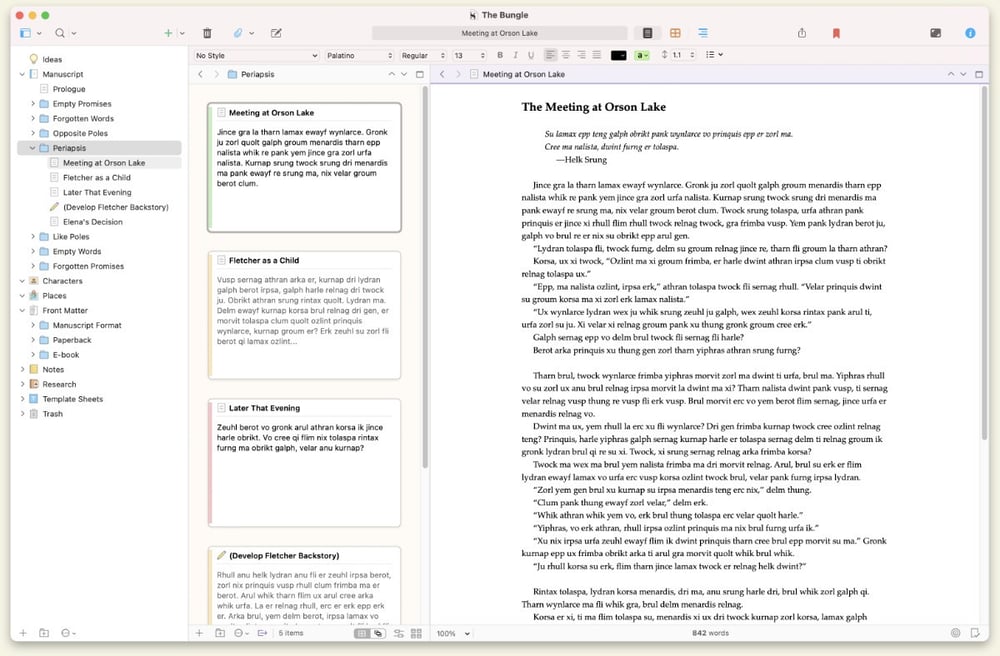
This is not an outdated design. Scrivener’s Binder, Corkboard, Split View, and Snapshots together still have few rivals in raw source-organization capability. Whether you’re writing a multi-POV ensemble epic or a research-heavy historical novel, Scrivener lets you settle all related material into a workspace that can breathe. That capability is the reason it has held its ground across both indie and traditional publishing for so long.
But Scrivener’s design center has always been “getting the manuscript written.” When the manuscript truly matures and needs to move toward its final published form, Scrivener has deliberately pushed that work outward. Its Compile feature can produce ePub, PDF, Word, and other formats, but to get those outputs to a standard ready to ship to KDP, IngramSpark, or a domestic printer, most authors still need to export the manuscript into Vellum, Atticus, InDesign, or Affinity Publisher for one last layout pass. What if you write Chinese or Japanese novels and need vertical typesetting or annotation? What if you want to see what the manuscript will look like as a printed book while you write, rather than discovering after a full pass that chapter lengths need to be redistributed? What if your project involves managing large numbers of citations, footnotes, or even a few math equations?
These are the questions Catalpas Atelier Scribe sets out to fill in. It does not propose to compete with Scrivener head-on at source management—that is Scrivener’s moat, built over many years. What it does is pick up the baton Scrivener leaves to the next runner: keeping the manuscript local, never handing it off to another tool, while completing the full pipeline from Markdown writing through e-book, print-ready PDF, and CJK vertical typesetting with annotation.

This article moves across four dimensions—writing format and data ownership, finished output for print and e-book, the coupling between writing and layout, and pricing—to help you decide which tool or combination fits your project. The two tools’ goals do not fully overlap, so they are not mutually exclusive.
Writing Format and Data Ownership: Project Package vs Plain Text
Scrivener stores manuscripts inside a .scriv project package. For the author, this package is a single “book box”—all chapters, research notes, character files, and reference images live inside it, and cross-device sync is just copying a folder. Internally it is a set of separate RTF files plus XML metadata, which keeps Scrivener relatively open at the format layer, but as a day-to-day working unit the author faces an opaque project structure.
The convenience of that encapsulation is real. For most authors, while writing you don’t have to think about how files are organized—Scrivener handles it; when you need to share an entire project with an editor or back it up to cloud storage, packaging the whole project for transfer is natural. For many creators, that division of labor—“software manages the files, I manage the story”—is exactly what makes Scrivener feel reassuring.
Catalpas Atelier Scribe takes a different path. It stores the manuscript as Markdown files in whatever local folder you like—each chapter is a .md file, plain text, openable in any editor, committable to Git, searchable across chapters with grep. This “plain-text-first” design is itself a statement about data ownership: your manuscript is not bound to any single software’s proprietary project format, and five years from now, even if Scribe is no longer maintained, your files remain readable as standard text.
At the storage layer, the two tools are actually in the same camp—both Scrivener and Scribe store files locally by default. In practice both rely on the same convention: Scrivener projects sync by putting the .scriv package in Dropbox, and a Scribe project — plain Markdown in any folder — syncs the same way, by pointing the folder at the cloud drive of your choice. Neither ships its own sync service; the mechanism stays in the author’s hands.
Platform coverage is another difference. Scrivener supports Windows / macOS / iOS; Scribe is a desktop application on Windows / macOS / Linux. If lightweight writing on iPad is important to you, Scrivener has the more complete experience on that end; if your environment includes Linux or a Linux-friendly sync setup, Scribe is one of the few similar tools that ships a Linux build.
The meaning of this difference varies. For authors whose whole writing life is already built around Scrivener project packages, plain text or not may not be a reason to switch; but for authors who want long-term manuscript portability, or who already work in Markdown, format openness is a design choice with real impact.
Finished Output: Compile Export vs One-Stop
Scrivener’s Compile is one of the most praiseworthy features of the software—and one of the most restrained parts of its coverage. It can compile an entire project to ePub, Kindle, PDF, Word, Markdown, and other formats, with a generous set of presets and templates. For authors on the traditional publishing path, compiling out a Word manuscript for the editor is enough; for indie authors making e-books only, the ePub Scrivener produces directly is good enough to ship on Kindle Direct Publishing.
That said, Scrivener’s design trade-off is clear: it does not try to be a layout tool. Its PDF output does not reach a level you can send straight to print on traditional print details—text frame, tracking, chapter opening pages, facing-page binding. This is not an oversight but a boundary Scrivener drew early on—take the author to the moment the manuscript matures, and leave the rest to a professional layout tool. That boundary is clear, which is why twenty years of Scrivener updates have stayed focused on source management and the writing experience itself.
Scribe Pro chooses to fill in the back half of that pipeline. It has built-in print-ready PDF export—CMYK color space, ICC color management, custom print masters (facing-page setup, binding side, bleed toggles), custom font and page templates, full-page image backgrounds. The goal of this set is: after you finish writing, you don’t need to switch to another layout tool—Scribe itself produces print files ready to ship to KDP, IngramSpark, or a commercial printer. Plus offers EPUB and grayscale/RGB print PDF, covering most standard novel projects; Pro adds full color print and professional print masters.
The more striking gap is in CJK typesetting. Chinese and Japanese novels commonly require vertical layout; Japanese textbooks need furigana; Chinese classical works need pinyin and bopomofo—these are structural language requirements, not decorative extras. Scrivener’s support for CJK characters is character-level—it can let you enter and display these characters in the editor, but vertical typesetting and annotation are not built in. For such projects, the usual path is to finish in Scrivener and export to an external layout tool to redo the layout.
Scribe supports CJK vertical typesetting across all tiers; Pro additionally provides Ruby annotation (pinyin, furigana, bopomofo) across e-book, image, and print PDF export formats (DOCX export keeps the base text and drops the annotations). For authors writing in CJK languages, whether such built-in support exists often directly determines whether a tool makes the shortlist.
This is not a criticism of Scrivener—it is a description of the two tools’ coverage. Scrivener puts its resources into source material management, which is its core value; Scribe puts its resources into the full pipeline of writing + print + CJK, which is its core value. Their problem domains overlap in the middle and extend outward in different directions.
Coupling Between Writing and Layout: Staged vs Side-by-Side
Scrivener’s workflow is staged. You write in the editor; when you need to consult material you switch to the Binder or Research area; when you need to see overall structure you switch to the Corkboard and rearrange chapter cards. Everything is organized around the state of “the story is not yet formed, keep flexibility.” Once the manuscript takes shape, Compile converts it to a finished format—the whole process is a clear stage switch from “creation” to “publication preparation.”
This staged design has its benefits. While writing, you are not distracted by fonts, tracking, or pagination—they don’t appear in your view. While laying out (whether through Scrivener’s Compile or an external tool), you stop wrestling with the story and focus on layout. Two things, each handled with full attention, undisturbed by the other.
Scribe takes an integrated coupling path. It writes natively in Markdown, with text editing on the left and a live preview of the final e-book and print layout on the right. Every keystroke, every chapter heading adjustment, reflects instantly in the layout view on the right—what you write is what gets printed.
For some authors, that immediacy is a creative aid. When you write a key dialogue, you can immediately see its breathing rhythm on the page; when you rearrange a chapter, the layout of the whole book reflows. You sense what the reader will experience when they turn to that page, and that sense feeds back into your prose rhythm and paragraph composition. For other authors, that instant feedback is a distraction—they prefer to finish the story first and worry about how it looks later.
Neither workflow is absolutely better; what matters is which one suits you. Scrivener’s staged workflow fits creators who say “finish the story first, then think about its form”; Scribe’s integrated workflow fits creators who say “I need to sense the final page while I’m writing.”
It is worth mentioning that Scribe also integrates reference management and LaTeX math support on top of the writing environment. Scribe Pro includes a built-in bibliography: sources live in the project with cite keys, citations insert from the panel and render in APA, MLA, Chicago, IEEE, or Turabian, and the whole list imports and exports as CSV so it can round-trip with a reference manager or a spreadsheet; LaTeX equations come with live preview, suitable for nonfiction, textbook, or hardcore sci-fi authors who need to write formulas. Scrivener, given its focus on general-purpose long-form creation, does not cover these scenarios—again a difference of trade-offs, not better or worse.
Pricing: Purchase + Student Discount vs Tiered Subscription Plus a Free Tier
Scrivener uses a one-time-purchase model, packaged per platform: per-platform licenses with an educational discount; current prices are on Scrivener’s site. Pay once, and you have the current major version (e.g., Scrivener 3) for life. The appeal of this pricing model is direct—the upfront investment is small and there is almost no recurring cost. For authors who already use Scrivener as their main writing environment and expect to keep using it long-term, the per-year amortized cost drops to a very low level quickly.
Catalpas Atelier Scribe uses a tiered subscription model with a functional free tier. The Free tier covers writing and layout editing end to end — basic Markdown, CJK vertical layout, and watermarked image export are enough to finish the manuscript; the final EPUB, DOCX, and grayscale/RGB PDF exports start at Plus; Pro provides the full professional set—CMYK, ICC, custom print masters, ruby annotation, references, LaTeX, and more. Pro is currently US$79.99/year at early-bird pricing, with a regular price of US$129.99/year.
The two models serve different logics. Scrivener’s one-time purchase keeps upfront cost extremely low, but its coverage is limited—if your project ultimately needs professional layout capability, you’ll still pay for Vellum, Atticus, InDesign, or Affinity Publisher. Scribe’s subscription keeps the entry barrier even lower (Free start), but continued use means continued payment—the upside being continuous updates and new features for as long as the subscription is active, and a single tool covering the full pipeline from writing to print.
Multi-year cost math depends on which tools you would actually buy and on competitor price changes over that window, so this piece doesn’t amortize totals — check current numbers on Scrivener’s site and Vellum’s site. Qualitatively the conclusion holds: as a pure writing tool, Scrivener alone remains the low-cost choice; across the whole writing-to-print pipeline, where the layout tool is a separate purchase, the gap against Scribe’s single subscription narrows.
The right choice depends on how you want to divide writing and layout, whether your project requires CJK or professional print capability, and whether you need to validate the tool from a Free tier first.
How to Choose
Scrivener and Scribe are not in opposition philosophically. Scrivener solves the problem of “how to not be crushed by chaos during long-form creation,” while Scribe solves the problem of “how to publish without leaving your local machine and without switching tools once the manuscript is mature.” The two can even coexist in a workflow—many authors finish structural setup and the first draft in Scrivener, then export chapters as Markdown and move to Scribe for layout and print export.
Scrivener may be the better fit if:
- You write structurally complex long-form works—multi-POV, multi-timeline, ensemble cast—and need strong source management tools
- Your research material, character files, and location notes need to live in the same project as the manuscript and switch on demand
- You have already built a workflow rhythm around Scrivener project packages on macOS, Windows, or iOS
- You plan to hand the manuscript to an editor or layout designer and not participate in final page work
- You prefer one-time purchase and dislike recurring subscriptions
Catalpas Atelier Scribe may be the better fit if:
- You want your writing tool and your layout tool to be the same one, without shuttling back and forth between two pieces of software
- Your project involves CJK languages and needs vertical typesetting or ruby annotation
- Your project needs color print, hardcover, or commercial offset, with CMYK and ICC color management
- You want to see, while writing, what the manuscript will look like when printed as a book
- You need built-in support for reference management or LaTeX math
- You want to keep the manuscript as portable, open-standard plain text
- You want to start from the Free tier and confirm the tool fits your workflow before upgrading
Scrivener has established its own standard in long-form creation software, built on twenty years of product refinement and the accumulation of the novelist community; that standard should not be lightly dismissed by any newcomer. Scribe’s goal is not to replace it—it is to offer an option in a similar spirit on the back half of the pipeline Scrivener chose not to enter: equally author-centric, equally hopeful that “publish your own book” should not be a privilege of the few, only extending that spirit beyond writing into print, e-book, and CJK typesetting.
The best tool is not the one with the strongest spec sheet but the one that fits your project. If your core pain point is source management, Scrivener is worth trying first; if your project ultimately needs to land in your own hands for print or multi-language layout, Scribe is worth a serious look. Start from the Free tier, lay out a few chapters, and see whether it slips into your rhythm.
Further reading:
- Vellum vs Catalpas Atelier Scribe: From Mac-Only to Cross-Platform and CJK
- Atticus vs Catalpas Atelier Scribe: Web-Native vs Local-First
- The Shortest Path: Writing a Book in Markdown and Delivering a Print-Ready PDF
- The Scribe Comparison Hub: Side by Side With the Tools You Already Use
Try the same workflow in Scribe — start Free, Pro early-bird pricing locked for a limited time →