
Novel-planning software for complex stories in 2026: characters, timelines, and tasks
Planning a multi-viewpoint story? Explore seven tools for long-form structure, time models, knowledge networks, collaboration, and multi-view Story data.
You are writing a four-viewpoint mystery set in a harbor city. Book one has two narrative timelines, three groups concealing different relationships, and a collection of shipping records that will matter in the second half. Then you move the pivotal disappearance two days earlier. The chapters are reordered, but the age table, clue list, research notes, and revision tasks still contain the old date.
The difficulty in a complex story is rarely just “too many characters.” One decision can affect the work in several directions, while every supporting document becomes another object to maintain. Before choosing novel-planning software, ask: Will chapters be reordered often? Does story time require calculation? Do relationships among characters and places need to be inspected from multiple angles? Does research participate in the plot? Can a problem become a bounded author task?
The most impressive demonstration is not necessarily the feature a writer will still use six months later. A multi-strand novel needs a sustainable daily practice: after one change, the writer can see what else deserves attention; an unresolved thought can become a specific task; and planning material does not demand that she retell the entire story before returning to the prose.
The seven tools below offer different, specific strengths. They are more useful when understood through the layer where your Project creates the most rework than when compressed into a single score.
Scrivener: a mature long-form project
Binder, Corkboard, and Outliner keep chapters, scenes, synopses, and metadata legible. Research keeps source material close to the manuscript, while Scrivenings returns separate pieces to a continuous reading surface. For writers who think primarily in chapters and regularly reorder a long draft, these workspaces keep structure, summaries, and supporting material in one established project.
It is particularly well suited to books whose manuscript structure is the main planning problem. If the next pressure comes from cross-checking relationships, geography, story dates, or several lines of evidence, decide whether those perspectives belong in additional material or at the center of daily work.
Manuskript: open-source, method-led planning
Here, Manuskript means the olivierkes/manuskript project. Licensed under GPL-3.0-or-later, it gives GNU/Linux, macOS, and Windows writers a path from premise and Outline to characters, plots, and Index Cards. Its openness and adaptability are meaningful strengths for writers who like to expand a book methodically from a central idea.
If you prefer to establish a method and populate the story layer by layer, Manuskript offers clear handholds. Once daily drafting begins, consider whether its division of workspaces and navigation continues to fit the way you maintain research and author tasks over time.
Plottr: make narrative strands visible first
Plottr centers visual timelines, scene cards, narrative strands, and Series View, with a Story Bible for characters and places. It suits writers who want to see structure before drafting and inspect several strands on a single visual surface. The series perspective also gives cross-book planning a direct entry point.
Clear visual planning makes authority an important decision. When a rewritten scene changes the story, the writer needs a rule for updating the timeline, character information, and series facts. That rule may be a deliberate manual handoff or a working method that keeps more of the Project together.
Aeon Timeline: when time must withstand calculation
Multigenerational histories, travel-sensitive historical novels, and fantasy with custom calendars need more than a list of dates. Aeon Timeline can model events, people, places, narrative arcs, and narrative order, then work with age, interval, duration, and relative dates.
When a date error can undermine the book’s credibility, a specialist time model may remain authoritative. It solves time itself; the writer still establishes clear boundaries with prose, research, tasks, and other Project material.
Obsidian: a flexible local Markdown knowledge network
Local Markdown, Links, Backlinks, Graph, and Canvas make Obsidian attractive for knowledge that grows over time. Writers can design their own properties, templates, and connections, then extend the workflow through plugins. For someone who enjoys building a personal system, that openness is the central appeal.
A complex novel often grows its knowledge network and its current writing workload at once. Ask whether you want one knowledge base across works or several fictional worlds that each open with a familiar author workflow. Both are reasonable needs, but they lead to different Vault, configuration, and maintenance decisions.
Notion: shared databases and varied views
Notion databases, views, comments, and permissions give collaborators a visible Workspace for co-writing, outline review, and research. A team can examine the same data as character records, progress, tasks, or a schedule without asking which attachment contains the current table.
As collaborative decisions settle and the Project enters months of sustained prose work, the lead writer may care more about continuous editing, an authoritative local source, versions, and publication handoff. That does not diminish a collaborative Workspace. It means shared story decisions and the formal long manuscript can have different centers of responsibility.
Scroll: several perspectives on one Story
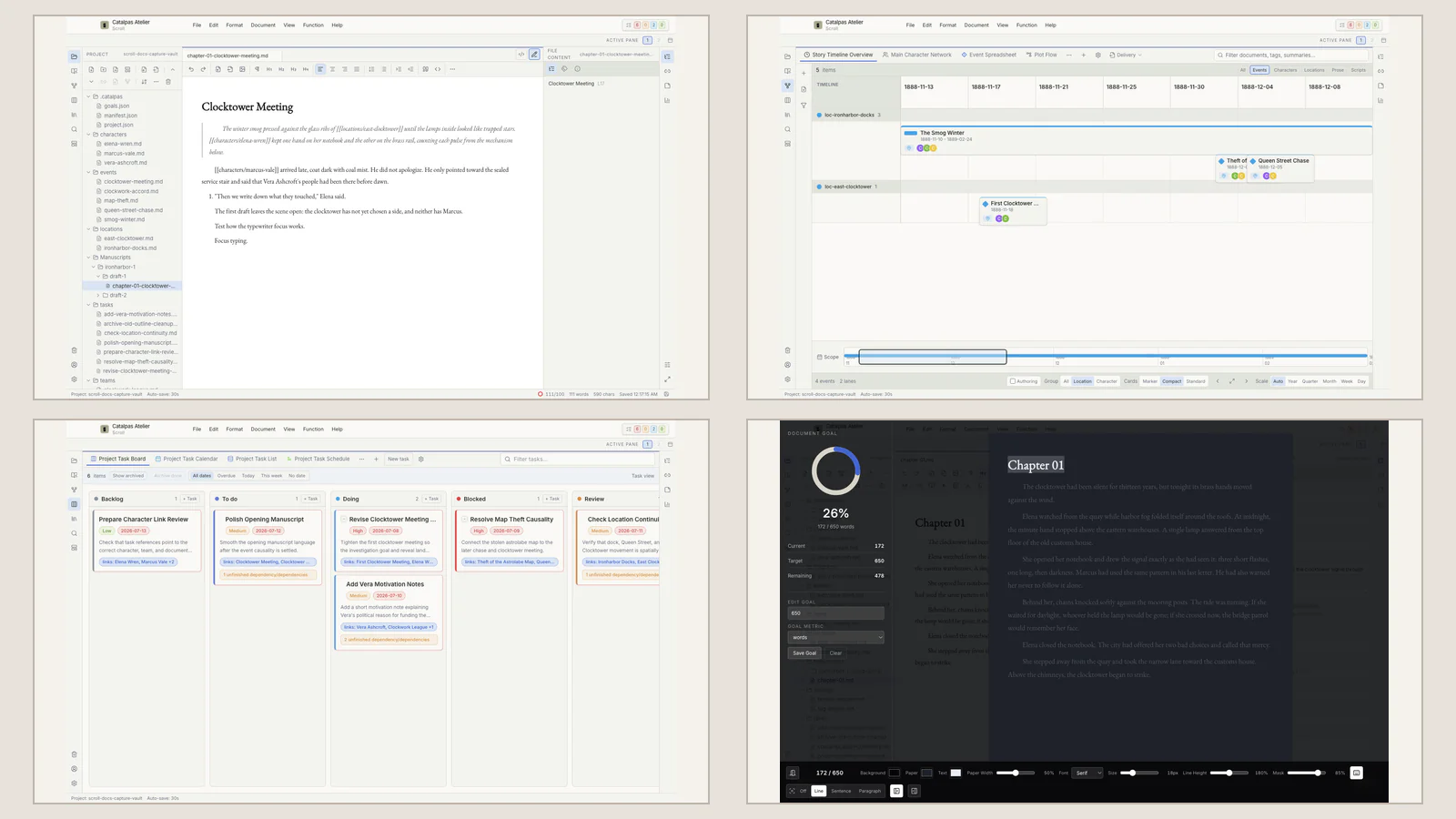
Scroll begins with a local Project. Characters, places, organizations, and events are Story data that can be inspected through Spreadsheet, Timeline, Relationship graph, Map, and other saved Story views. Prose, research, and author tasks keep their own responsibilities. The writer changes the perspective on recorded information rather than copying a person or event into a separate planning document for every question.
Return to the harbor mystery. The writer checks the disappearance and witness statements in Timeline, reviews her recorded character connections in Relationship graph, finds the shipping records in References, and creates a task to revise the testimony in chapter eight. Who knew the secret at which time still requires deliberate fields, Notes, and manuscript review. Scroll does not perform the deduction or certify the plot.
An editor later notices that the testimony conflicts with a tide record. The writer traces the date change to three chapters, two character notes, and one revision task. She then realizes that one discrepancy should remain: the dockworker’s false time can become evidence that he is lying. The views help make the affected area visible; the author decides what survives. What might have become a search through the entire book becomes an explainable revision path.
This working surface is useful when several types of question regularly affect one another. A linear story with a small cast may need a file tree and light outline. A Project whose primary risk is intricate date calculation may benefit from a specialist tool’s depth. Integration is not a demand to fill every field; it reduces the need for the same fact to chase itself across multiple supporting documents.
For a writer with ninety minutes each evening, the difference is tangible. She can move from an event or character to the relevant context, leave an unresolved problem as a task, and continue the scene. The benefit is less about saved clicks than the energy required to re-enter the book. Unfinished judgment remains in the Project for tomorrow rather than depending on memory.
To assess maintenance pressure, write down where character birthdays, event dates, chapter order, research judgments, and revision status are currently authoritative. A combined workflow can work across several systems if its update order is explicit. If updates are routinely missed, several views over one Project may reduce that burden. The number of tools is not the real problem; uncertainty about which location counts is.
Story events and author work should also remain distinct. An event records what happens in the fictional world. Kanban, Calendar, Task list, and Gantt record what the author plans to do next. Keeping those two kinds of time separate prevents “the character disappears on Friday” from becoming the same kind of card as “revise chapter eight by Friday.” See a Kanban workflow for novel-writing progress for that division.
For a deeper account of shared data across views, read why one Story may need eleven views. The manual checking path for a mystery continues in clues, chronology, and character knowledge.
Choose by recalling the recent change that affected the most supporting material, then decide whether it calls for a chapter project, visual plot, specialist time model, knowledge network, collaborative database, or integrated workbench around the current Story. Return to the 2026 tool guide to explore another creative pressure, or see how Scroll organizes this kind of Project.