Adobe InDesign vs Catalpas Atelier Scribe: An Industry Layout Tool and an Author-Friendly Print Pipeline
InDesign is the de facto standard in publishing; Scribe pulls the print capabilities indie authors actually use into the same app as Markdown writing, at roughly half the monthly fee.
Adobe InDesign vs Catalpas Atelier Scribe: An Industry Layout Tool and a Lightweight Print Pipeline for Indie Authors
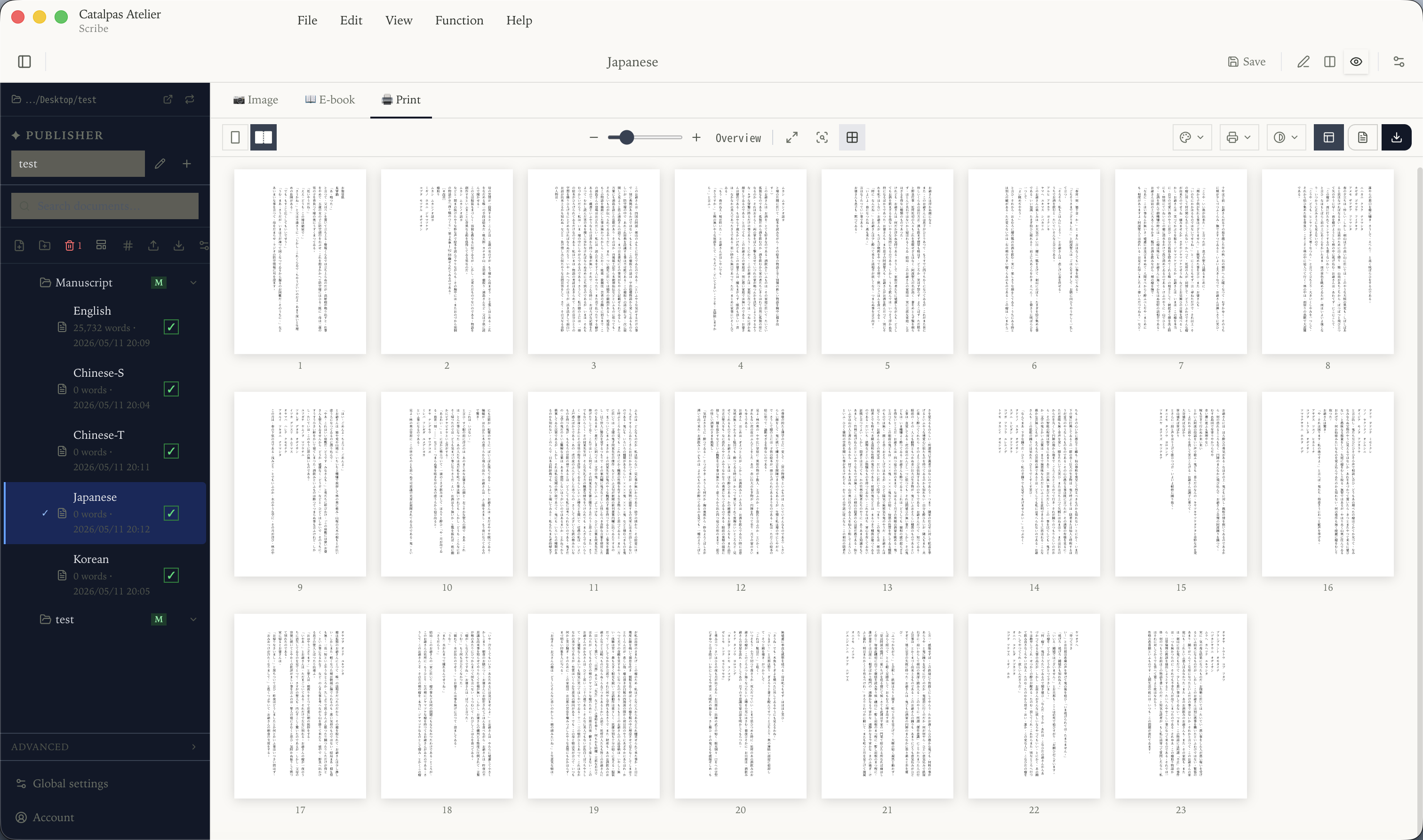
In publishing and design, Adobe InDesign is the undisputed de facto standard. From the interior pages of major-publisher books to the layouts of international magazines, from textbooks and supplementary materials to brand catalogs, from complex book layouts to prepress files for hardcover art books—InDesign is the default tool in nearly all of these scenarios. Its stability, its seamless asset pipeline with Photoshop and Illustrator, and the workflow conventions it has accumulated over years with commercial printers give it a near-monopoly in the professional layout space.

That position is not accidental. InDesign’s depth covers virtually every commercial layout scenario: complex spreads, grid systems, linked styles, variable data, prepress details (spot colors, UV, foil markers), and professional color management. Its scripting and plugin ecosystem is rich, and many large publishers build their internal layout automation on top of InDesign. When a book moves through the full commercial offset workflow—from designer to prepress to printer—the InDesign file (.indd) is typically the standard artifact passed along that pipeline.
But InDesign’s product form is designed for a specific kind of user: professional designers, in-house layout teams at publishers, and prepress studios. It assumes the user already has layout and prepress knowledge—knows how to handle bleed, spot colors, font embedding, ICC profiles; it assumes the manuscript has been written elsewhere and a designer is placing finished copy into InDesign for layout. For an independent author, that chain of assumptions often does not hold. What if you just want to produce a novel as both a printed book and an e-book by yourself? What if you have no designer to work with, and no intention of spending months learning a professional layout tool? What if you need CJK vertical typesetting or ruby annotation? What if your budget simply cannot stretch to InDesign’s professional subscription tier?
These are the questions Catalpas Atelier Scribe is built to answer. It does not aim to compete with InDesign in professional publishing or magazine layout—that is not its goal. What it aims to do is fold the writing stage that InDesign leaves to authors, together with the small subset of print-layout capability authors actually use, into a single application, offered at roughly half InDesign’s monthly fee.
This article moves across four dimensions—use cases and product positioning, the coupling between writing and layout, author-oriented specifics, and pricing—to help you decide which tool or combination fits your project best. The target audiences of the two tools sit in different segments to begin with.
Use Cases: A General-Purpose Industry Layout Tool vs Author-Focused Specialization
InDesign is a general-purpose, industry-grade layout tool. Its feature set is designed for “everything professional layout needs”: magazines, art books, textbooks, professional reference books, brand collateral, ads, catalogs, annual reports—these are InDesign’s comfort zone. It offers complete text-and-image composition, asset linking with the Adobe suite, professional prepress color management, and a rich scripting and plugin ecosystem.
For studios and publishers actually doing this kind of work, InDesign’s value is obvious: it is the lingua franca for communicating with commercial printers, and the de facto platform for large team projects. Many publishers’ internal workflows are deeply tied to InDesign—layout templates, font standards, and prepress check scripts are all built on top of it. That deep coupling is the very reason InDesign holds its ground in the professional space.
But that depth also means a learning curve. An indie author with no layout background typically needs weeks to months of study to use InDesign well enough to produce print-ready output. That is not a flaw in InDesign; it is the nature of its professional positioning—it serves users who already have layout knowledge, not authors entering the world of layout from zero.
Catalpas Atelier Scribe takes a different path—specializing in the concrete scenario of “an indie author publishing a long-form book alone.” Its target user is very specific: self-publishing novelists, academic researchers, nonfiction writers, small studios—people who share the trait that their work is primarily long-form text, visual elements are relatively restrained, no designer is involved, and they want to take a book from first draft to shelf-ready finished product by themselves.
For most indie authors, the layout features actually used day to day fall into a relatively small range: toggling between spreads and single pages, bleed and binding side, font import and tracking control, table of contents and headers/footers, chapter opening pages, grayscale/RGB/CMYK PDF export, and EPUB 3 export. Scribe treats this subset as “sensible defaults plus a few parameters,” and builds a Markdown editor with live layout preview directly into the writing stage, so indie authors don’t have to learn a professional layout tool before they can start making a book.
This is not a criticism of InDesign. InDesign’s depth is its value—it serves the professional publishing and design industry, and that industry needs that depth. Scribe is not trying to become the next InDesign; that is not its goal. The problem domains of the two tools only overlap at “the print output of a book,” and each extends outward in a different direction.
Coupling Between Writing and Layout: Staged vs Side-by-Side
InDesign’s workflow is classic “write first, lay out later.” Writers or authors finish the manuscript in Word, Scrivener, or another tool, then import the finished text into InDesign, where a designer or layout-capable author handles the page design, places images, and adjusts fonts and tracking, and finally exports a PDF for print. Throughout the process, writing and layout are two clearly separate stages, completed in different software—sometimes by different people.
This staged design has its logic. For a professional publishing team, the writer drafts, the editor stitches, the designer lays out, the prepress engineer checks for print—each stage handled by a different specialist using a different specialized tool. InDesign thrives in this kind of workflow.
But for indie authors, “one person playing every role” is the norm. When writer, editor, designer, and prepress are all the same person, a staged workflow means that one person has to switch repeatedly between Word (writing) → InDesign (layout) → Acrobat (prepress check), each switch carrying the cost of file format conversion, style remapping, and font re-matching. Many indie authors end up giving up on InDesign and reaching for something lighter.
Scribe takes an integrated coupling path. It writes natively in Markdown, with text editing on the left and a live preview of the final e-book and print layout on the right. Every keystroke, every chapter heading adjustment, reflects instantly in the layout view on the right—what you write is what gets printed.
That immediacy is, for indie authors, a workflow simplification. When you write a scene of dialogue, you can immediately see its breathing rhythm on the page; when you adjust chapter length, the layout of the whole book reflows accordingly. You don’t have to switch between writing software and layout software, nor shuttle the same manuscript back and forth in different formats.
Neither workflow is absolutely better; what matters is the shape of your project. If you are working on a magazine, an art book, or a professional publishing project, with dedicated writers and designers on the team, InDesign’s staged workflow is the right way to work. If you are one person making a text-centric book, Scribe’s integrated path saves a great deal of time otherwise lost to tool-to-tool handoff.
Author-Oriented Specifics: CJK, Bibliography, LaTeX
InDesign’s CJK support is industry-grade—it has dedicated Chinese and Japanese editions (InDesign CJK), with full support for vertical typesetting, line-end prohibition rules, furigana, phonetic annotations, and binding-side recognition for facing pages. Inside professional Chinese or Japanese publishers, InDesign CJK is the de facto standard. The depth of that capability is beyond question.
But for indie authors, using InDesign CJK means two layers of friction: the learning cost of InDesign itself, and the configuration of CJK-specific features (many CJK behaviors need to be enabled in preferences or via scripts). For someone who just wants to produce a single Chinese novel or Japanese essay collection, those two layers together often turn indie authors away.
Scribe supports CJK vertical typesetting across all tiers, with native adaptation to Chinese, Japanese, and Korean typographic traditions—punctuation rotation in vertical text, line-end prohibition rules, directional handling of Chinese/Roman numerals, and binding-side recognition for facing pages. The Pro tier additionally offers Ruby annotation (pinyin, furigana, bopomofo), covering e-book, document, image, and print PDF export formats. These behave as out-of-the-box defaults requiring no extra configuration. For authors writing in CJK languages, whether such native support exists often directly determines whether a tool makes the shortlist.
Beyond CJK, Scribe integrates several author-focused capabilities. Scribe Pro includes built-in integration with reference managers like Zotero, allowing citations from research notes to be inserted into the body and the bibliography automatically maintained; LaTeX math equations come with live preview, suitable for nonfiction, textbook, or hard-sci-fi authors. InDesign can achieve similar things through plugins, but they need to be purchased or configured separately—a trade-off of its general-purpose layout positioning.
Conversely, InDesign offers capabilities Scribe does not, in visually dense work and prepress detail. Complex spreads, spot colors, UV and foil markers, variable data, asset pipelines with Photoshop/Illustrator, automated prepress checking scripts—these are core requirements for magazines, art books, brand collateral, or large publishing projects. If your project demands more in layout complexity than in text flow, or you need to work with a commercial printer through a professional workflow, InDesign remains the more appropriate tool.
Pricing: Creative Cloud Subscription vs Tiered Subscription Plus a Free Tier
InDesign is available through Adobe Creative Cloud: single-app subscription is about US$22.99/month or US$263.88/year; if you also need Photoshop and Illustrator, Creative Cloud All Apps runs about US$59.99/month or US$659.88/year. For professional publishing and design studios, this is a reasonable cost band—in exchange you get industry-grade depth and ecosystem integration.
Catalpas Atelier Scribe uses a tiered subscription model with a functional free tier. The Free tier offers the full basic Markdown writing and layout capability, sufficient to complete a project end to end; Plus unlocks EPUB and grayscale/RGB PDF export; Pro provides the full professional set—CMYK, ICC, custom print masters, ruby annotation, references, LaTeX, and more. Pro is currently US$79.99/year at early-bird pricing, with a regular price of US$129.99/year. In China, settlement is in RMB through a WeChat Mini Program.
The two models serve different logics. InDesign’s subscription serves professional publishing studios and designers—that is its core audience, for whom the monthly fee is a reasonable investment. Scribe’s subscription serves indie authors and small studios, holding the monthly cost to roughly half of InDesign’s single-app subscription, and using the Free tier to let authors verify the fit before committing.
Concretely: three years of InDesign single-app subscription totals about US$791, averaging about US$264 per year; three years of Scribe Pro at early-bird price averages US$80 per year—about 30% of InDesign single-app. For indie authors who “write their own books, self-publish, and are budget-sensitive,” that gap is not a marginal difference but the key to whether a project starts at all.
This is not a criticism of InDesign pricing. InDesign’s price corresponds to the professional user base it serves; Scribe’s price corresponds to the indie author base it serves. The two tools’ target audiences sit in different segments, and their prices should not be plotted on the same axis.
How to Choose
InDesign and Scribe are not actually in opposition on a philosophical level. InDesign solves the deep problem of “every layout capability the professional publishing and design industry needs,” while Scribe solves the lightweight problem of “how an indie author can produce a book alone without learning a professional layout tool.” There is almost no competition between them—professional publishers will not abandon InDesign because Scribe exists, and indie authors will not force themselves through a professional tool just because InDesign is powerful.
Adobe InDesign may be the better fit if:
- Your project is a magazine, art book, textbook, professional reference, or any visually dense publication
- You or someone on your team has a layout background and can put InDesign’s depth to use
- Your project requires a professional workflow with a commercial printer that expects InDesign files
- You need the Adobe asset pipeline (Photoshop / Illustrator)
- You need complex prepress capabilities—spot colors, variable data, automated prepress check scripts
- You already pay for Adobe Creative Cloud, so using InDesign carries no incremental cost
Catalpas Atelier Scribe may be the better fit if:
- You are an indie author or small studio doing everything from writing to print yourself
- Your project is text-centric, with relatively restrained visual elements
- Your project involves CJK languages and you need vertical typesetting or ruby annotation
- You want writing and layout to be the same thing, without handing off to a second professional tool
- You need built-in support for reference management or LaTeX math
- You need a native Linux workflow (InDesign does not offer a Linux version)
- Your budget cannot sustain InDesign’s professional subscription
- You want to start from the Free tier and confirm the tool fits your workflow before upgrading
InDesign has established an indisputable standard in professional layout and publishing, built on decades of product refinement and the shared accumulation of the global publishing ecosystem; that standard should not be lightly dismissed by any newcomer. Scribe’s goal is not to replace it—it is to offer a targeted solution in the indie-author lane InDesign does not aim to cover: Markdown writing, long-form structure management, print-ready PDF, and CJK typesetting in one application, at a price indie authors can actually sustain.
The best tool is not the one with the strongest spec sheet but the one that fits your project. If your project is professional publishing or visually dense, InDesign remains the safer choice; if you are one person writing a text-centric book, Scribe is worth a serious look. Start from the Free tier, lay out a few chapters, and see whether it slips into your rhythm.
Further reading:
- Affinity Publisher vs Catalpas Atelier Scribe: A One-Time-Purchase Layout Tool and an Author-Oriented Writing Pipeline
- An Affordable InDesign Alternative: Making Book Interiors on a Smaller Budget
- The Shortest Path: Writing a Book in Markdown and Delivering a Print-Ready PDF
- The Scribe Comparison Hub: Side by Side With the Tools You Already Use
Try the same workflow in Scribe — start Free, Pro early-bird pricing locked for a limited time →