
Affinity Publisher vs Catalpas Atelier Scribe: A One-Time-Purchase Layout Tool and an Author-Oriented Writing Pipeline
Affinity Publisher is a one-time-purchase professional layout tool covering visually dense projects; Scribe puts the layout capabilities authors actually need inside the writing tool itself.
Affinity Publisher vs Catalpas Atelier Scribe: A General-Purpose Layout Tool and an Author-Oriented End-to-End Pipeline
For the last decade, self-publishers and small studios have been searching for “an InDesign alternative they can actually afford.” Among all the candidates, Affinity Publisher is just about the only product that truly delivers the combination of “professional-grade layout capability + one-time purchase.” It comes from Serif, a British company, and together with Affinity Designer and Affinity Photo forms a toolchain that can substitute for the Adobe Creative Cloud trio—at a combined price that barely exceeds one month of an Adobe subscription.
That value is not Affinity Publisher’s only strength. Its engine matches any commercial layout tool in visual precision: CMYK color management, bleed and facing-page setup, the Master Page system, seamless mixing of vector and raster—everything a professional layout workflow needs. The Studio Link feature lets you summon Designer and Photo tools directly inside the same document, removing the back-and-forth of switching files. For studios producing magazines, art books, brochures, posters, and visually dense books, Affinity Publisher is a very stable choice in its lane.
But Affinity Publisher’s product form is designed for a specific workflow: the manuscript has already been written, and a designer or a layout-capable author drops it into Publisher to finalize the page design. It is not itself a writing tool, and it is not specially optimized for long-form prose manuscripts. What if you are an indie author writing a novel or nonfiction essays, with no designer to collaborate with? What if you want writing and layout to be the same activity, rather than finishing your draft in Word or Scrivener and then importing it into a second piece of software? What if you need CJK vertical typesetting or ruby annotation? What if you just want to take a text-centric book to a state where it can ship directly to KDP or IngramSpark, without paying the extra learning cost of a general-purpose graphic design tool?
These are the questions Catalpas Atelier Scribe is built to answer. It does not aim to compete with Affinity Publisher in visually dense projects—that is not its goal. What it aims to do is fold the writing stage Affinity Publisher leaves to the author, together with the layout capabilities authors actually need, into a single application.
This article moves across four dimensions—form factor and product positioning, the coupling between writing and layout, CJK and author-oriented specifics, and pricing—to help you decide which tool or combination fits your project. The target audiences of the two tools do not fully overlap, so they are not mutually exclusive.
Form Factor: General-Purpose Layout vs Author-Oriented Writing Pipeline
Affinity Publisher is a general-purpose desktop layout tool. Its positioning is “the InDesign alternative for self-publishers and small studios,” and its feature set is designed for general layout needs: magazines, art books, posters, brochures, catalogs, annual reports, visually dense books—these are Affinity Publisher’s comfort zone. It has complete text-and-image composition, vector drawing tools, raster editing (via Studio Link into Photo), text wrap, linked styles, tables, and footnotes—everything a real professional layout tool should have.
For studios or independent designers doing this kind of work, Affinity Publisher’s value is clear: a one-time purchase with no recurring fees that substantially undercuts the cost of an InDesign subscription, covering the layout needs of self-publishers and small studios. Affinity also has a well-established user base among small publishers and independent magazines.
Catalpas Atelier Scribe’s product form is very different. It is not a general-purpose layout tool but an “author-oriented integrated writing + layout tool.” Its target user is very specific: indie authors, self-publishers, academic researchers, nonfiction writers, small studios—people who share the trait that their work is primarily long-form text, visual elements are relatively restrained, no designer is involved, and they want to take a book from first draft to shelf-ready finished product by themselves.
This positioning difference drives the two tools to make opposite trade-offs. Affinity Publisher goes deep on vector drawing, complex text wrap, and prepress color management, but it does not include a Markdown editor and does not offer chapter-level structural management for long manuscripts; Scribe goes deep on Markdown writing, chapter-level structure, and live e-book and print preview, but does not try to replace what a designer does in a magazine layout or art-book project. Their problem domains only overlap at “the long-form book completed by one person.”
This is not a criticism of Affinity Publisher; it is a description of the two tools’ positioning. One serves the professional layout studio, the other serves the indie author’s end-to-end pipeline, and each goes deep in its own lane.
Coupling Between Writing and Layout: Staged vs Side-by-Side
Affinity Publisher’s workflow is classic “write first, lay out later.” Authors or writers finish the manuscript in Word, Scrivener, Ulysses, or another tool, then import the finished text into Affinity Publisher to handle layout, add images, adjust fonts and tracking, and finally export a PDF. Throughout the process, writing and layout are two clearly separate stages, completed in different software.
This staged design has its logic. While writing, you should not be distracted by tracking, pagination, and facing pages—those belong to the layout stage; while laying out, you should not be interrupted by line edits—those belong to the writing stage. For teams actually doing magazine work or visually dense projects, this division often even corresponds to different roles—writers, layout designers, editors stitching the two ends together. Affinity Publisher thrives in this kind of workflow.
But for indie authors, this staged workflow introduces a feedback delay. While writing outside Affinity Publisher, you cannot see what your manuscript will look like on the page. You think a dialogue is tightly paced, only to discover after import that pagination has scattered it; you carefully tune a chapter’s length, only for the final layout to render an awkward orphan page. Revisions need to happen back in the writing tool, then imported into Publisher again, then re-adjusted. The loop is not painful, but for an author doing everything alone, a significant chunk of time is spent on software switching and file conversion.
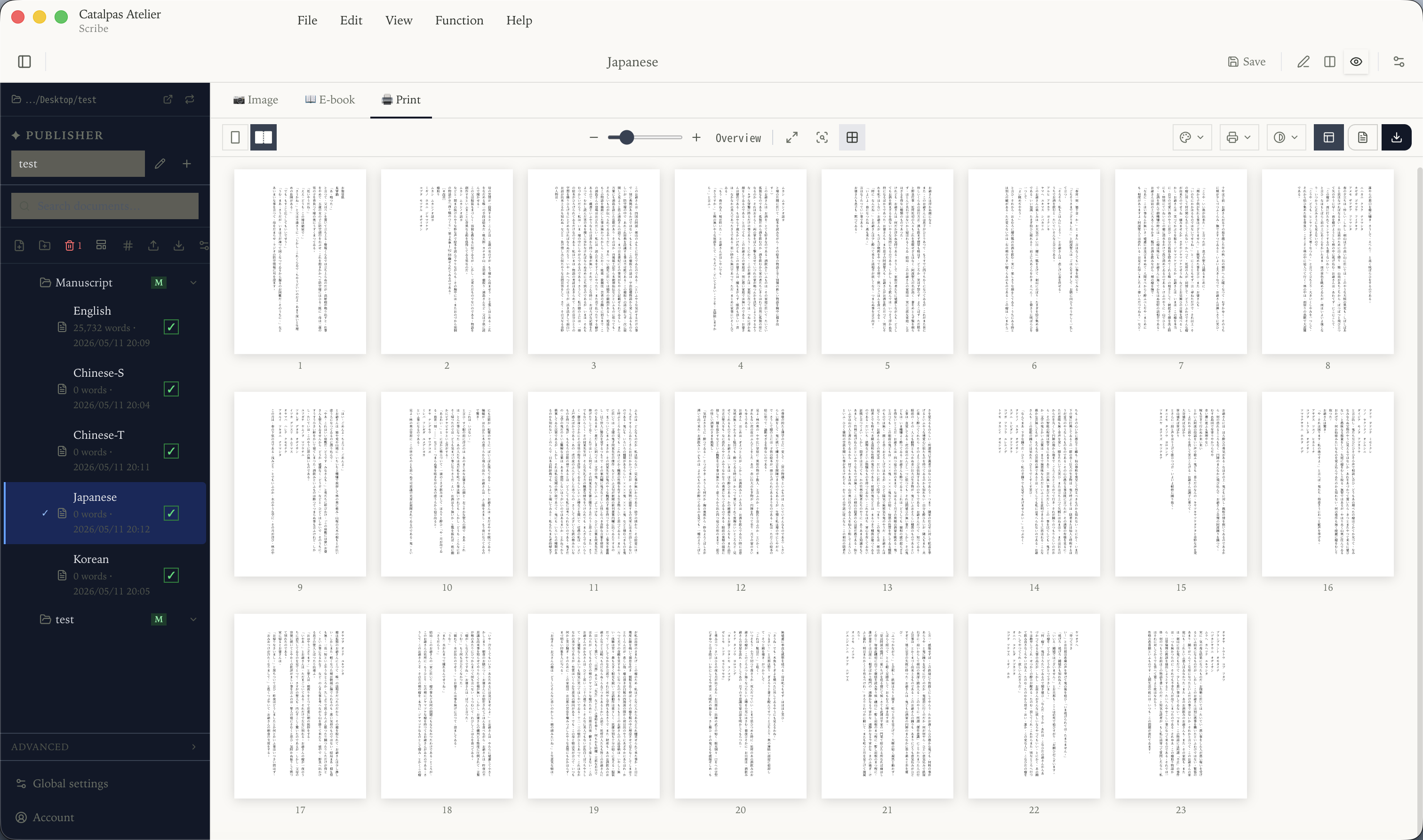
Scribe takes an integrated coupling path. It writes natively in Markdown, with text editing on the left and a live preview of the final e-book and print layout on the right. Every keystroke, every chapter heading adjustment, reflects instantly in the layout view on the right—what you write is what gets printed.
That immediacy is, for indie authors, a workflow simplification. When you write a scene of dialogue, you can immediately see its breathing rhythm on the page; when you adjust chapter length, the layout of the whole book reflows accordingly. You don’t have to switch between writing software and layout software, nor shuttle the same manuscript back and forth in different formats.
Neither workflow is absolutely better; what matters is the shape of your project. If you are doing a magazine or an art book, with dedicated writers and layout designers on the team, Affinity Publisher’s staged workflow is the right way to work. If you are one person making a text-centric book, Scribe’s integrated path saves a great deal of time otherwise lost to tool-to-tool handoff.
CJK and Author-Oriented Specifics
Affinity Publisher’s CJK support has improved in recent years, with recent versions adding vertical text and some East Asian typesetting details, but using it for a complete Chinese or Japanese book project still requires considerable work—many details have to be configured by the author, and there are no presets specifically designed for CJK workflows. This is not Affinity’s oversight; its core user base sits in Europe and North America, and CJK has not been a priority direction for its product evolution.
Scribe supports CJK vertical typesetting across all tiers, with native adaptation to Chinese, Japanese, and Korean typographic traditions—punctuation rotation in vertical text, line-end prohibition rules, directional handling of Chinese/Roman numerals, and binding-side recognition for facing pages. The Pro tier additionally offers Ruby annotation (pinyin, furigana, bopomofo), covering e-book, image, and print PDF export formats (DOCX export keeps the base text and drops the annotations). For authors writing in CJK languages, whether such native support exists often directly determines whether a tool makes the shortlist.
Beyond CJK, Scribe integrates several author-oriented capabilities on top of the writing environment. Scribe Pro includes a built-in bibliography: sources live in the project with cite keys, citations insert from the panel and render in APA, MLA, Chicago, IEEE, or Turabian, and the whole list imports and exports as CSV so it can round-trip with a reference manager or a spreadsheet; LaTeX math equations come with live preview, suitable for nonfiction, textbook, or hard-sci-fi authors; structured support for comic script formats is also provided in Pro. These are scenarios Affinity Publisher does not specifically cover, given its general-purpose layout positioning—again, a trade-off in design, not a matter of better or worse.
Conversely, Affinity Publisher offers capabilities Scribe does not, in visually dense projects. Studio Link lets you summon Designer’s vector drawing and Photo’s raster editing directly inside the layout document; complex text wrap, linked styles, and fine control of prepress color profiles—these are core requirements when producing magazines, art books, and brand collateral. If your project demands more in visual density than in text flow, Affinity Publisher remains the more appropriate tool.
Pricing: One-Time Purchase vs Tiered Subscription Plus a Free Tier
Affinity Publisher uses a one-time-purchase model: the single product is a one-time purchase, with a Universal Bundle if you also need Designer and Photo; current prices are on Affinity’s site. The appeal of this model is strong—pay a modest sum once and produce no subscription bills for years, with Affinity offering discounted upgrades to existing users every few major versions (V2, V3), but never forced. For authors or studios who want software to be “set up like furniture and used for years,” Affinity’s purchase model carries real peace of mind.
Catalpas Atelier Scribe uses a tiered subscription model with a functional free tier. The Free tier covers writing and layout editing end to end — basic Markdown, CJK vertical layout, and watermarked image export are enough to finish the manuscript; the final EPUB, DOCX, and grayscale/RGB PDF exports start at Plus; Pro provides the full professional set—CMYK, ICC, custom print masters, ruby annotation, references, LaTeX, and more. Pro is currently US$79.99/year at early-bird pricing, with a regular price of US$129.99/year.
The two models serve different logics. Affinity Publisher’s one-time purchase keeps upfront investment modest and produces almost no long-term cost, especially well suited to authors or teams who can already handle layout themselves and simply need a good tool. Scribe’s subscription keeps the entry barrier extremely low (Free start), but continued use means continued payment—the upside being continuous updates and new features for as long as the subscription is active, and a single tool covering the full pipeline from writing to print.
Multi-year cost math depends on the exact plans you would buy and on competitor price changes over that window, so this piece doesn’t amortize totals — check current numbers on Affinity’s site and Scrivener’s site. On pure cost, Affinity + a writing tool is cheaper; but if you need CJK, ruby, LaTeX, or want writing and layout to be live-coupled, Scribe’s subscription covers ground that the Affinity combo does not.
The right choice depends on the type of your project (visually dense or text-centric), whether you need CJK or other specialized capabilities, and your preference between a one-time purchase and a small recurring fee.
How to Choose
Affinity Publisher and Scribe are not actually in opposition. Affinity Publisher solves the problem of “how to make professional layout capability affordable for ordinary people,” while Scribe solves the problem of “how an author can finish a book without learning a professional layout tool.” The two can even coexist—some indie authors use Scribe as the main writing tool while taking visually dense special-edition pages (color inserts, appendices, art-book sections) into Affinity Publisher to complete.
Affinity Publisher may be the better fit if:
- Your project is visually dense—magazines, art books, brand collateral, posters, brochures
- You or someone on your team has a layout background and is comfortable with how professional layout tools work
- You need complex text-image composition, vector drawing, and fine control of prepress color profiles
- You prefer a one-time purchase and don’t want an annual subscription
- Your workflow allows writing and layout to happen in separate software at separate stages
Catalpas Atelier Scribe may be the better fit if:
- You are an indie author or small studio doing everything from writing to print yourself
- Your project is text-centric, with relatively restrained visual elements
- Your project involves CJK languages and you need vertical typesetting or ruby annotation
- You want writing and layout to be the same thing, without juggling two pieces of software
- You need structured support for reference management, LaTeX math, or comic script
- You want to start from the Free tier and confirm the tool fits your workflow before upgrading
Affinity Publisher has established its own standard in the value-priced professional layout space, built on Serif’s years of technical work and its explicit alternative posture toward Adobe’s subscription model; that standard should not be lightly dismissed by any newcomer. Scribe’s goal is not to compete with it in visually dense layout—it is to offer a targeted solution in the author-oriented workflow Affinity Publisher does not aim to cover: writing, chapter management, print-ready PDF, and CJK typesetting in one application, so indie authors do not have to learn two professional tools at once.
The best tool is not the one with the strongest spec sheet but the one that fits your project. If your project is visually dense or you already have layout skills, Affinity Publisher is worth trying first; if you are one person writing a text-centric book, Scribe is worth a serious look. Start from the Free tier, lay out a few chapters, and see whether it slips into your rhythm.
Further reading:
- Adobe InDesign vs Catalpas Atelier Scribe: An Author-Friendly Lightweight Print Pipeline
- An Affordable InDesign Alternative: Making Book Interiors on a Smaller Budget
- The Shortest Path: Writing a Book in Markdown and Delivering a Print-Ready PDF
- The Scribe Comparison Hub: Side by Side With the Tools You Already Use
Try the same workflow in Scribe — start Free, Pro early-bird pricing locked for a limited time →