
Academic and Nonfiction Writing: Bibliography and LaTeX Formulas in One Editor
Papers, nonfiction, and textbooks have long been fragmented across an 'editor + citation manager + formula typesetter' triad. Pulling them into one app is possible.
Academic and Nonfiction Writing: Bibliography and LaTeX Formulas in One Editor
The working environment of academic and nonfiction writers has long been fragmented across a triad: the editor you write in, the library you manage citations in, and the LaTeX environment you typeset formulas in. When you sit down to write a research review, a textbook, or a long-form nonfiction piece with data and equations, your attention is forced to shuttle between three tools — write a paragraph in Word, jump to Zotero to find a reference, copy a BibTeX key, return to Word, insert the citation, then jump to Overleaf, typeset a formula, screenshot it, paste it in. This “tool-switching tax” is mild annoyance when the writing is going well, but it repeatedly breaks the train of thought during a critical argumentative passage.
In 2026 there’s still no widely accepted “standard answer.” The LaTeX workflow (Overleaf / TeXShop / VS Code + LaTeX Workshop) is the undisputed gold standard for formulas and citations, but pure LaTeX is a high bar for many writers — you stare at \section{}, \cite{}, and \begin{equation} directly, and the writing flow is chopped up by markup. Conversely, Word and Pages are light on the writing experience but weaker on citation management and formula typesetting — they need plug-ins, image insertion, or dedicated tools like MathType to fill the gap.
Around this triad problem, 2026 has produced some tools aimed at pulling everything back into a single editor — Typora supports Markdown + LaTeX formulas but has weak citation management; Obsidian can hook into Zotero via plugin but stays note-oriented; R Markdown and Quarto integrate well in data science but lean toward research reports rather than general academic writing. Each solves a piece of the triad problem, but few simultaneously put “smooth writing experience,” “usable citation management,” “live LaTeX preview,” and “print-grade PDF output” into one place.
The piece below goes through four dimensions — the cost of the fragmented triad, citation integration, live LaTeX preview, and how to coexist with an existing Zotero + Overleaf setup — and presents Catalpas Atelier Scribe Pro’s current form on this path.
The cost of the fragmented triad: a broken argument flow
Switching between three tools looks like “just a few extra clicks,” but the real cost surfaces during sustained argument-writing. The hard part of academic writing isn’t typing each word — it’s sustaining an argumentative chain held up by dozens of citations, a handful of formulas, and several data figures. Every jump to Zotero for a citation, every jump to Overleaf for a formula, requires you to pick that chain back up when you return. The cost of “picking it back up” is invisible but real.
More concretely, the fragmented triad creates several recurring problems:
- Interruption cost on citation insertion — every
\cite{}means leaving the current paragraph to fetch a BibTeX key or DOI. - Visual rupture in formula typesetting — a formula screenshot pasted into Word doesn’t match the body font, isn’t searchable, and can’t be edited later.
- Cross-tool version drift — citation metadata updated in Zotero isn’t reflected in Word’s citation; a formula symbol changed in Overleaf, but you forgot to regenerate the screenshot.
- Format reconciliation on export — submission journals and publishers require consistent citation formats and formula layout; each tool of the triad does its own thing, and you spend a day at the end “unifying.”
None of these is fatal, but accumulated, they raise the psychological threshold for “start writing” without you noticing.
Citation integration: cite directly in the editor
The ideal: while writing, you type [@knuth1984] and the editor immediately shows the corresponding citation (title, author, year); on export, it renders the right inline citation and reference list according to the style you’ve picked (APA / Chicago / IEEE / journal-specific).
The key to this isn’t “building an in-tool library” — there’s no need to reinvent Zotero. The practical bridge is a structured list that round-trips as CSV: your reference manager (Zotero, Mendeley, JabRef, or a plain spreadsheet) stays the home of the library; when it’s time to write, you export the list as CSV and import it into the writing tool, so the sources and their cite keys are available while you write.
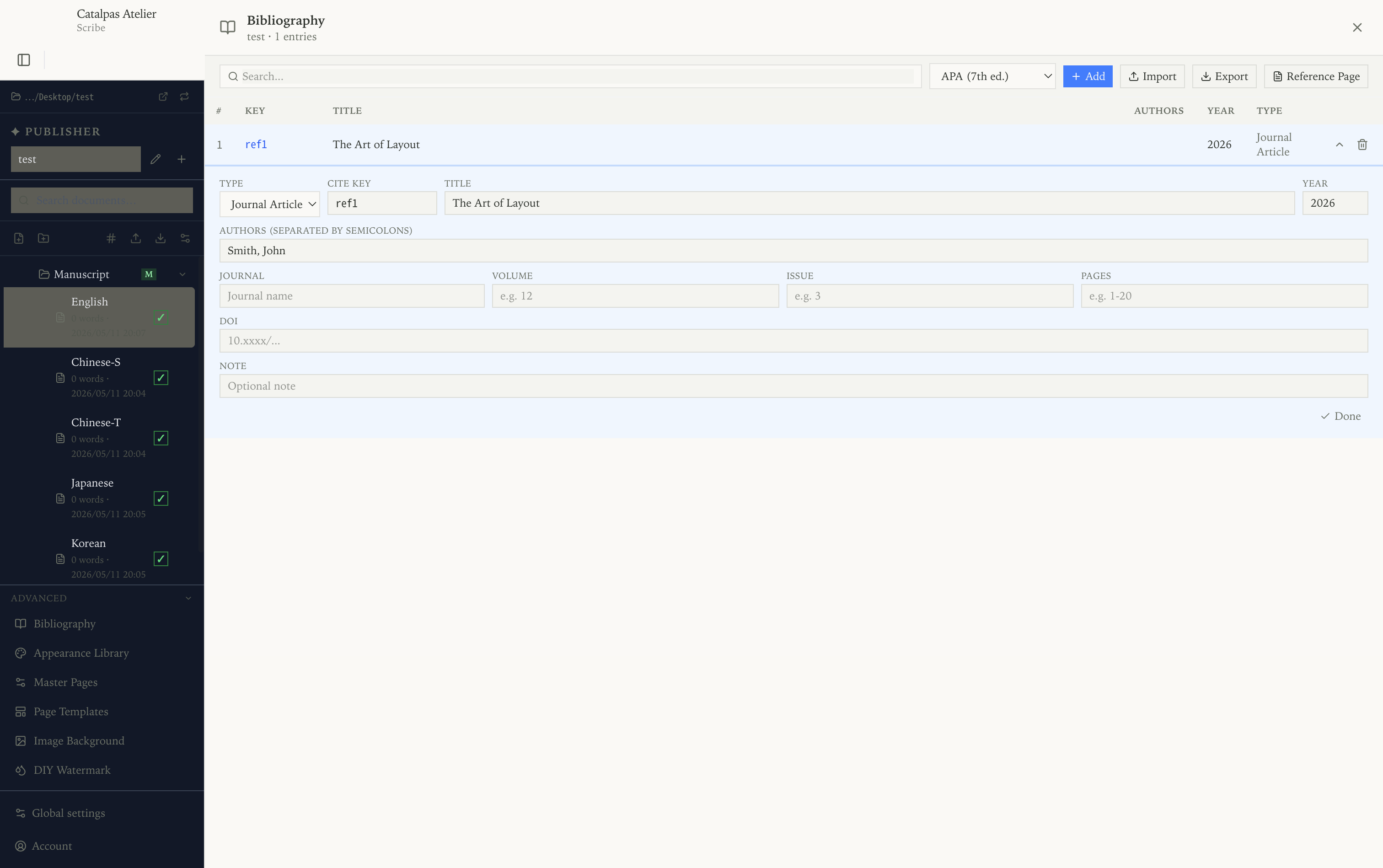
Scribe Pro takes this route through its Bibliography panel: every source lives in the project with a cite key, you insert a citation from the panel while writing and it renders in the chosen style — APA, MLA, Chicago, IEEE, or Turabian — and Insert References Block places the formatted list at export. The whole bibliography imports and exports as CSV, so it doesn’t conflict with your existing library workflow: Zotero (or a spreadsheet) stays home for references, and the list moves into Scribe when a project starts writing.
Live LaTeX formula preview: bring formula typesetting back into the body
LaTeX formula support in a Markdown editor comes in tiers:
- Rendered only on export — you write
$E=mc^2$, see nothing in preview, but it renders correctly in the exported PDF. The most basic level of support. - Rendered in a preview pane — a split preview shows the formulas typeset, while the writing pane still shows source. Typora, Obsidian + plugins, and VS Code + Markdown Preview Enhanced all do this.
- Live WYSIWYG — in the writing pane itself, typing
$enters formula-editing mode, symbols render as you type, and on the closing$the formula is laid into the body. This is the closest experience to a true LaTeX editor.
Scribe Pro’s LaTeX support combines paths 2 and 3 — the left writing pane keeps the Markdown source (good for copy-paste and version control), and the right pane renders every formula into its final print form. The preview updates within milliseconds — you confirm the formula’s appearance without leaving the editor.
For academic and nonfiction writers, the value of that immediate feedback is that you no longer need to compile in Overleaf just to “check whether this formula looks right.”
Coexisting with or migrating from an existing Zotero + Overleaf workflow
A reasonable concern for many academic writers: “I’m already on Zotero + Overleaf — do I have to migrate everything?” The answer is no. Scribe isn’t designed to replace Zotero or Overleaf — it’s designed so that in certain scenarios you no longer have to switch out of the editor.
Keep Zotero as your library: Zotero continues to do reference fetching, metadata organization, and PDF attachment management. Scribe doesn’t aim to reinvent that. When a project starts, export the relevant sources to CSV (directly or via a spreadsheet) and import them into the Scribe project’s bibliography — the workflow connects without leaving Zotero as your library.
Keep Overleaf as a collaborative LaTeX environment: if your paper requires Overleaf collaboration with co-authors, or the target journal has a specific LaTeX template, you don’t need to replace that path. Scribe fits single-author academic books, nonfiction, textbooks, and research reports — scenarios whose common pain is “I want LaTeX-quality formulas and citations, but I don’t want to endure pure LaTeX as a writing experience.” Scribe Pro covers that span via Markdown writing + live LaTeX preview.
Export compatibility: Scribe Pro exports print-grade PDF directly (CMYK, ICC, custom masters), EPUB 3 for ebooks, and DocX for editorial round trips. If a particular project eventually needs to be finished in Overleaf, the Markdown source can be converted to LaTeX via Pandoc — the source is always open.
Making your choice
For academic and nonfiction writers, tool choice is fundamentally about balancing “writing fluency” against “output precision.”
If your work is a co-authored paper, a submission targeting a specific LaTeX-template journal, or you’re already deeply embedded in the Overleaf ecosystem, that path doesn’t need replacing — it remains optimal in its proper niche.
In the following cases, consolidating the triad into one editor may be the better fit:
- You’re working solo or in a small team on long-form nonfiction, academic books, or textbooks;
- You value a smooth writing experience and don’t want to jump out of the editor every few minutes for citations and formulas;
- Your citation management already lives in Zotero or a spreadsheet, and you want the list usable inside the editor via CSV round-trip;
- Your output needs to be both EPUB (for ebook distribution) and print-grade PDF (for publication or self-published print);
- You need citations and formulas in a CJK context — Scribe Pro supports CJK vertical typesetting + LaTeX + citations together.
Scribe Pro is $79.99/year early-bird ($129.99/year regular). Start from the free tier to verify whether Markdown + live preview suits you, then upgrade to Pro to unlock LaTeX and citation management. Write a chapter or two and see whether it fits your rhythm.
Further reading:
- Local-first writing tools for novelists: keep your manuscript on your computer
- The shortest path from Markdown to a print-grade PDF book
- Typesetting software worth using at a small publisher in 2026
- The Scribe solutions hub: find your entry point by workflow
Try the same workflow in Scribe — Free to start, Pro early-bird locked in →