
How to Choose Typesetting Software for a Small Publisher in 2026
Compare InDesign, Affinity, Scrivener, Vellum, Atticus, and Scribe by layout complexity, EPUB, print PDF, platform, local workflow, and CJK needs.
Quick answer
Start with the deliverable, not a feature count:
- Choose Adobe InDesign when the book has complex visual layouts or must fit an established professional prepress workflow.
- Consider Affinity when you need professional page layout and PDF output without a recurring subscription; confirm the current version’s EPUB support before adopting it for an ebook-first workflow.
- Consider Vellum when a Mac-based team wants a constrained, preset-led path to EPUB and print PDF.
- Consider Atticus when cross-device writing, cloud backup, and template-led EPUB/PDF output matter most.
- Consider Scrivener when long-form drafting, research, and chapter organization come before final page design.
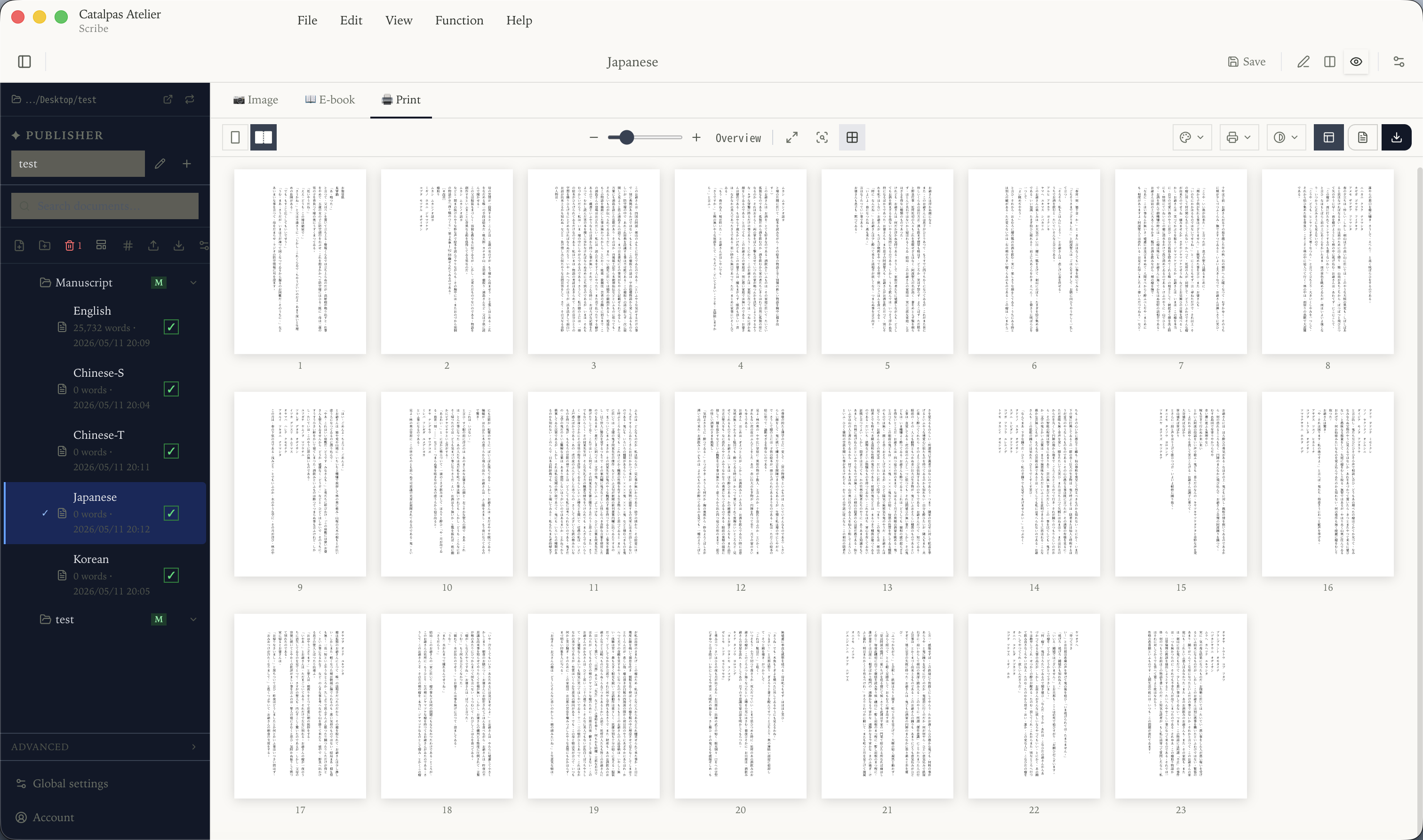
- Evaluate Scribe when the source is a local Markdown project and the same workflow also needs live pagination, multiple output formats, or CJK publishing features.
No tool wins every category. The practical choice depends on layout complexity, who owns the source manuscript, required formats, operating systems, collaboration, and the team’s prepress experience.
How we compared these tools
This review uses official product pages and documentation available on August 22, 2026. We did not run a hands-on competitor test. When a vendor’s public documentation does not establish a capability, we label it for confirmation instead of turning “not documented” into “not supported.”
The comparison follows six questions:
- Where will the team maintain the source manuscript?
- Is EPUB a required deliverable?
- Does the print workflow require CMYK, PDF/X, or deeper prepress control?
- Is the book mostly long-form prose, or a complex mix of text and graphics?
- Does the workflow require local files, offline access, or cross-device collaboration?
- Does the project need vertical CJK text, ruby, or other East Asian typography?
Comparison at a glance
| Tool | Best fit | EPUB | Print output | Workflow boundary |
|---|---|---|---|---|
| Adobe InDesign | Complex visual layouts and professional publishing teams | Reflowable and fixed-layout EPUB | Deep PDF, color, and prepress workflow | Windows/macOS; substantial learning and maintenance overhead |
| Affinity | Professional page layout and PDF with a lower software-cost barrier | Confirm against the current product version | Current product page describes PDF/X and professional page layout | Current page says the app is free for individual users; verify account, platform, and regional terms |
| Scrivener | Long-form writing, research, and chapter organization | Compile supports EPUB | Compile supports PDF | Output configuration takes time to learn; page design is not its only purpose |
| Vellum | Fast, consistent ebook and print production on Mac | EPUB 3, reflowable | PDF/X-1a and CMYK | macOS only; making and previewing is free, generating publishable files requires purchase |
| Atticus | Cross-device writing and template-led publishing | EPUB | Browser or installed app with cloud backup; import and export require internet | |
| Scribe | Local Markdown books, live pagination, multiple formats, and CJK projects | ePub in eligible tiers | PDF; advanced print controls in Pro | Windows/macOS/Linux desktop app; project files remain on the user’s device |
Capabilities omitted from the table are not necessarily absent. Verify any procurement-critical feature against the current vendor documentation and a project-specific sample.
Adobe InDesign: complex layout and professional prepress
InDesign is designed for page layout across books, magazines, and other graphic-rich publications. It is the natural candidate when designers and printers already exchange InDesign files or when the project needs precise grids, master pages, color management, and preflight controls.
An earlier version of this article incorrectly said that InDesign could not export EPUB. Adobe’s current documentation describes both reflowable and fixed-layout EPUB export. The useful distinction is therefore not “print only.” It is that InDesign offers detailed control and a mature professional workflow, while a prose-only team may face more training, subscription, and production-process overhead than it needs.
Choose InDesign when complex layout or an existing Adobe/prepress workflow outweighs simplicity.
Affinity: distinguish Publisher 2 from the current product
The current Affinity product combines vector, image, and page-layout work in one application. Its official page describes master pages, text styles, professional layout, PDF/X, and free use for individual users. That makes it relevant to small teams that want hands-on page design and print-ready PDF without a recurring software subscription.
The older Affinity Publisher 2 supported-format list does not list EPUB export. That document does not, by itself, prove what every current Affinity build can or cannot do. If EPUB is mandatory, confirm the exact version available to your team and its export formats before committing the production workflow.
Choose Affinity when professional page composition and PDF are central; treat EPUB as a version-specific acceptance item.
Scrivener: organize the long book, then Compile
Scrivener centers the drafting project: chapters, research, notes, metadata, and flexible reordering. Its Compile system can produce EPUB, PDF, Word, and other formats, so it should not be described as a writing tool that cannot deliver files on its own.
The boundary is workflow fit. Compile has options and formats to learn, while complex visual design or commercial prepress may still be easier in a dedicated page-layout tool. Scrivener is strongest when the difficult part is controlling a long manuscript before final production.
Vellum: a preset-led Mac workflow
Vellum runs on macOS, imports DOCX, and generates reflowable EPUB 3 files as well as PDF/X-1a, CMYK print output. Its value proposition is a deliberately constrained collection of book styles and previews rather than unrestricted page design.
The official purchasing FAQ says users may download, create, and preview books for free, while generating publishable files requires a purchase. Check the current purchase options on the vendor site rather than relying on a price copied into a comparison article.
Choose Vellum when the team uses Mac and prefers a guided style system over extensive manual layout control.
Atticus: cross-device work with defined offline limits
Atticus combines writing and formatting, supports EPUB, PDF, and DOCX output, and can be used in a browser or as an installed progressive web app. Its official material also describes automatic cloud backup and collaboration.
It is inaccurate to call Atticus either “cloud only” or “fully offline.” Its access documentation says writing can continue offline after the app has been opened and authenticated, but importing and exporting require an internet connection. A small publisher should decide whether this account-and-cloud model fits its source-control and handoff practices.
Choose Atticus when moving between devices and using a template-led writing-to-export workflow are more important than deep prepress control.
Catalpas Atelier Scribe: a local project and multiple outputs
Catalpas Atelier develops Scribe, so this section is not an independent endorsement. The same relationship is disclosed in the editorial record below.
Scribe is a Windows, macOS, and Linux desktop application. A project keeps Markdown source and publishing settings on the user’s device, and the editor provides a paginated layout preview. Depending on the active tier, the same project can export images, ePub, Docx, and print PDF. Pro adds capabilities including CMYK/ICC workflows, ruby, references, and further CJK and print controls; confirm current tier boundaries on the product page and in the Scribe documentation.
Scribe is built with Electron. It should not be promoted as “not a web shell,” and it does not currently promise built-in cloud synchronization. Its relevant distinction is the local project model, not an inaccurate claim about implementation technology.
Choose Scribe when a local Markdown source, live pagination, multiple outputs, or CJK requirements belong in the same production project. For graphic-heavy or specialized commercial prepress work, InDesign or Affinity may be the more direct fit.
Make the final decision with one representative chapter
Before adopting a tool, build a small acceptance sample from your own book:
- Choose a chapter containing headings, body text, emphasis, images, footnotes, or ruby that represent the real manuscript.
- Set the target trim size, margins, bleed, fonts, and ebook metadata.
- Produce every required output, especially EPUB and print PDF.
- Check the EPUB in the target reading systems and validate it; compare the PDF with the printer’s specification.
- Record the manual corrections, handoffs, and the location of the authoritative source manuscript.
- Only then compare the current commercial terms and the cost of training or rework.
The best tool is the one that delivers your actual book with the fewest fragile handoffs—not the one with the longest feature list.
Further reading
- Scribe yearly guide hub
- Scribe comparison hub
- Export EPUB and print PDF from one source manuscript
- An affordable alternative to InDesign for a book interior
Catalpas Atelier develops Scribe. Try a representative chapter, font set, and target specification before adopting or upgrading any production tool.
Sources and verification
- Adobe InDesign Checked
- Adobe: Export to EPUB Checked
- Affinity Checked
- Affinity Publisher 2: Supported file formats Checked
- Scrivener overview Checked
- Vellum technical specifications Checked
- Vellum purchasing FAQ Checked
- Atticus Checked
- Atticus: accessing the application Checked
- Atticus: collaboration Checked
- Catalpas Atelier Scribe Checked
- Scribe documentation Checked
Disclosure: Catalpas Atelier develops Scribe. Competitor information in this article comes from the vendors' official public documentation; we did not perform hands-on competitor testing for this review.