
CJK Vertical Typesetting for Self-Publishing: Can One Desktop App Take You All the Way?
CJK vertical typesetting + ruby + print-grade PDF have long been a gray zone between Word and InDesign. Here's a realistic desktop-side route.
CJK Vertical Typesetting Self-Publishing: Can One Desktop App Take You All the Way?
CJK vertical typesetting has long sat in a gray zone in the self-publishing workflow. Horizontal — the Western-style left-to-right, top-to-bottom flow — is well supported across nearly every modern writing and typesetting tool. But vertical, the traditional CJK direction that contemporary deluxe editions still use widely, has had few options. In 2026 the situation is better than before, but “solved” still overstates it.
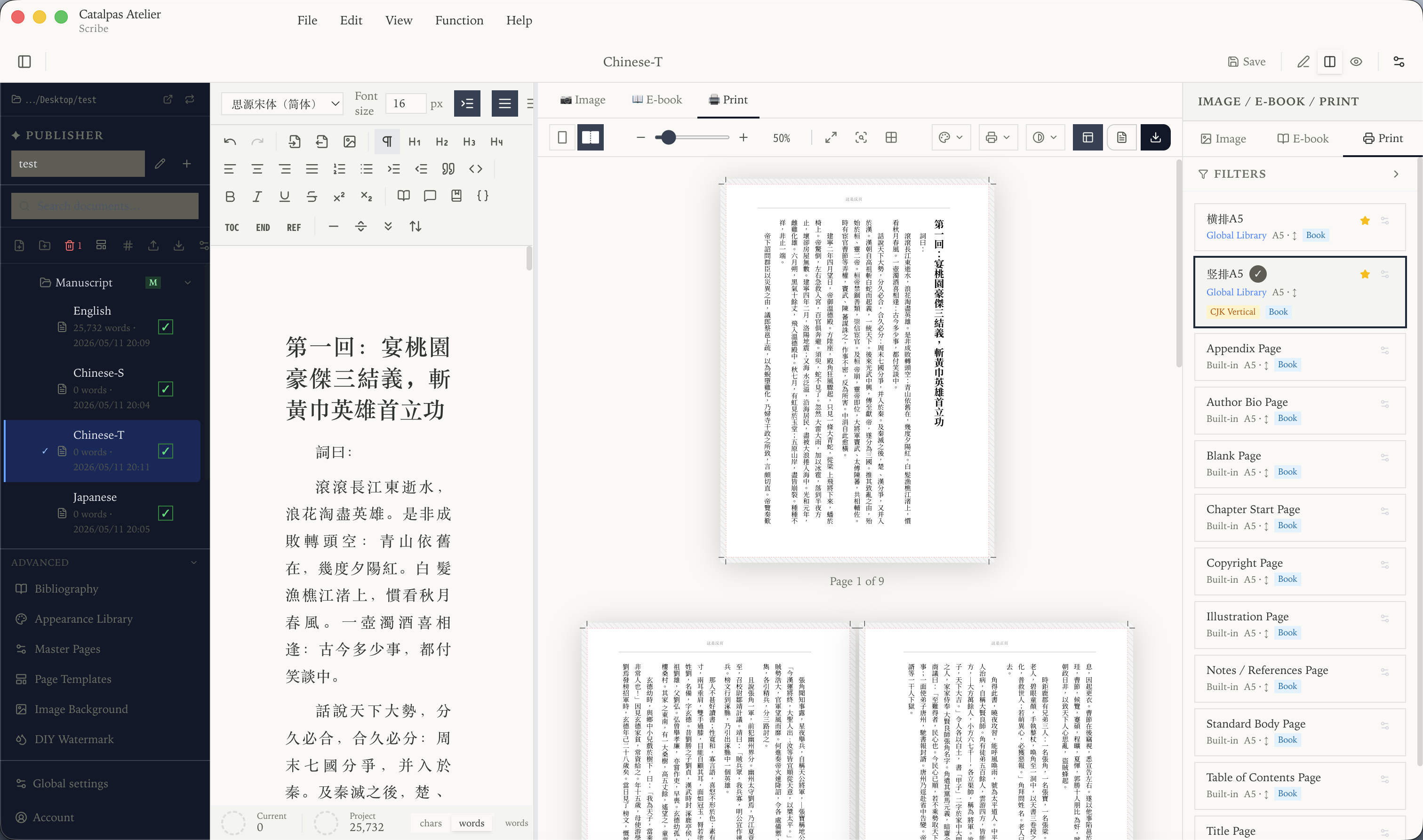
The tools most championed by the English-language indie publishing scene — Vellum, Atticus, Reedsy Book Editor — none of them support CJK vertical typesetting. That’s not a defect — their target users don’t make that a development priority. The result: independent authors writing in Chinese or Japanese who want a vertical edition (literary fiction in deluxe formats, traditional literature, translated manga, textbooks and classical reissues) get pushed onto two unfriendly paths — either use Microsoft Word or WPS Office for vertical layout that’s usable but not press-ready, or learn Adobe InDesign, Affinity Publisher, or LaTeX, paying real learning cost.
Around this path, 2026 has produced a few tools aiming to make “one author finishes CJK vertical self-publishing” a viable choice. This article isn’t out to dismiss InDesign’s place in professional typesetting — it remains the industry’s de facto standard and is unrivaled in complex multilingual layout — but for the independent author who just wants to self-publish one Chinese- or Japanese-language book, is there a third path?
The piece below covers four dimensions: the gray zone of CJK vertical in mainstream tools, the structural need for ruby, the desktop print pipeline, and the dual-track release workflow (horizontal ebook + vertical hardcover).
CJK vertical in mainstream tools: the gray zone
Vertical isn’t just “rotate the characters 90 degrees.” It involves a whole set of layout conventions different from horizontal:
- Text flows top to bottom, columns progress right to left;
- Punctuation forms and positions need to be remapped for vertical (period at lower-right, brackets like 「」 and 『』);
- Numbers and Latin letters mixed with CJK (“released in 2025”) need tate-chu-yoko (horizontal in vertical);
- Paragraph indentation, alignment, and line spacing rules also differ from horizontal.
Mainstream word processors — Word, Pages, Google Docs — have long stayed at “basically usable” for vertical: Word on Windows lets you switch to vertical mode but the precision still falls short of Chinese-publisher editor expectations; Google Docs in 2026 still has no real vertical support, and so does Notion.
Professional typesetting tools play at another level: InDesign has full CJK vertical capability (World-Ready Composer + Japanese/Chinese/Korean editions), and Affinity Publisher caught up with vertical support in a recent release. But neither is designed for writing — authors typically draft in Word or another tool, then import into InDesign for typesetting, adding a handoff step.
That’s the gray zone of the CJK vertical self-publishing workflow: writing tools’ vertical is usable but not precise; typesetting tools’ vertical is precise but unsuitable for writing. Authors either accept the precision loss, or accept the cost of tool switching.
Ruby isn’t decoration — it’s structural
Ruby (the Japanese name; “注音” or “拼音” in Chinese, “한글 위에 한자” in Korean) is another long-standing CJK publishing pain point. For the scenarios below, ruby isn’t a “decorative feature” — it’s a structural requirement the product must support:
- Japanese fiction (especially light novels and children’s literature) uses furigana extensively to mark difficult kanji;
- Chinese textbooks and children’s books widely use pinyin annotation;
- Modern translations of classical works and traditional literature use phonetic guides to assist contemporary readers;
- Korean publications occasionally pair hanja (한자) with hangul ruby.
Ruby has a standard <ruby> element in the EPUB 3 spec, but actual implementation requires the tool to handle all of:
- Input convenience on the writing side (typing
<ruby>tags by hand is painful); - Visual alignment in preview (ruby font size, line spacing, alignment);
- Multi-format export compatibility (EPUB 3’s
<ruby>tag + character-level alignment in print PDF; DOCX export keeps the base text and drops the annotations).
Most English-oriented tools don’t support ruby — it isn’t a need in their user base. LaTeX supports it via macros like pxrubrica but requires LaTeX fluency. InDesign and Affinity Publisher support it, but on the typesetting side, not the writing side. For authors who want to “see the ruby alignment as they write,” the candidate pool is narrow.
The desktop print pipeline: CMYK, ICC, print masters
Vertical isn’t just an on-screen affair — it ultimately goes to press. Going to press requires more than “export PDF” — it requires a PDF the printer can accept and print correctly:
- Color space is CMYK, not RGB — RGB is screen color, CMYK is print color; mismatch means printed colors differ from expectations.
- Embed the correct ICC profile — the printer will specify the ICC to use (e.g., Japan Color 2001 Coated, China GB), and the PDF must embed it.
- Print master is correct — facing pages (left/right symmetric), binding side (left- or right-bound; CJK vertical defaults to right-bound), bleed (typically 3mm), gutter (extra margin on the binding side), registration marks.
- Fonts embedded — all CJK fonts must be embedded into the PDF, or the printer’s end may not render correctly.
These requirements aren’t author-friendly — they’re mostly “printer expectations the author may not know.” A tool that genuinely lets an author finish self-publishing print should make these details configurable but not from-scratch: common print sizes are presets, binding-side switch is a checkbox, ICC profiles can be loaded based on the target printer, bleed and registration marks are added automatically.
Catalpas Atelier Scribe: Pull the CJK Workflow onto the Desktop
Catalpas Atelier Scribe is one of the few desktop applications that makes all the above defaults: CJK vertical typesetting is available across all tiers; ruby covers both ebook and print export (Pro); CMYK, ICC, and print masters are in Pro.
All tiers: CJK vertical + Markdown writing + image export The Free tier supports CJK vertical — Chinese, Japanese, and Korean alike. Write in Markdown in the source pane, see vertical layout (with correct punctuation positions and tate-chu-yoko) in the live preview pane. This level is already enough for an author to finish writing and first-pass proofing of a vertical work at zero cost.
From Plus: EPUB 3 + DocX + grayscale / RGB PDF Unlocks EPUB 3 export (with full publishing metadata), DocX export (for editorial round trips), and grayscale or RGB PDF export (for regular screen reading and non-color print).
Pro: CMYK + ICC + custom print masters + font import + ruby The Pro tier provides the full print pipeline: CMYK color space, ICC color management, custom print masters (facing pages + binding-side switch + bleed + gutter), custom font import (load the printer’s specified Chinese/Japanese fonts directly), and ruby covering EPUB and print PDF export. Pro is $79.99/year early-bird, $129.99/year regular — well under an ongoing InDesign subscription (current InDesign pricing is on Adobe’s site).
One desktop application, three platforms The same desktop application installs on Windows, macOS, and Linux. CJK publishing authors’ devices often span multiple OSes (Mac at home, Windows at work, some on Linux); one application across the three platforms means the workflow doesn’t break across machines.
Dual-track release: horizontal ebook + vertical hardcover
Another common CJK publishing scenario is dual-track release — the same work ships as both horizontal (for mainstream e-readers, comfortable for contemporary readers) and vertical (hardcover, respectful of traditional layout). Both versions come from the same manuscript, only the output direction differs.
Scribe’s design on this: switch the layout direction (horizontal / vertical) in project settings, nothing else changes. The same Markdown source generates multiple outputs — horizontal EPUB + horizontal print PDF + vertical print PDF. For dual-audience distribution strategies, this “source doesn’t fork, outputs take multiple forms” workflow cuts maintenance cost.
A caveat: this path doesn’t replace the role of a professional typesetter and InDesign in large publishing projects. If you’re a publisher doing high-volume professional typesetting (dozens or hundreds of titles per year, complex layout and marketing requirements), InDesign remains the most reliable choice. Scribe fits independent authors or small publishers who finish CJK self-publishing alone.
Making your choice
CJK publishing tool choice depends, even more than the English-oriented case, on being clear about “what’s the form of your output.”
In the following cases, an integrated desktop tool may be the better fit:
- You’re an independent author or small publisher, going from writing to press yourself;
- Your project is long-form in Chinese, Japanese, or Korean (fiction, nonfiction, textbook, anthology);
- You need a vertical edition but don’t want to invest months in InDesign learning for one book;
- Your project needs ruby covering both ebook and print;
- You already write in Markdown and want the writing and typesetting sides under one roof.
InDesign remains the first choice for large publishing projects, complex multilingual work, and professional-typesetter collaboration; Affinity Publisher is a one-time-purchase desktop alternative for professional typesetting. Those tools’ positions aren’t taken by the route described here.
The safest move is to start from the Free tier — CJK vertical is fully usable on Free, enough to verify whether the writing workflow fits. Then upgrade to Plus or Pro to unlock the export capabilities you need. Write a few chapters in it and see whether it fits your rhythm.
Further reading:
- Typesetting software worth using at a small publisher in 2026
- Export EPUB and print PDF from one source manuscript: an indie author’s single-file workflow
- An affordable alternative to InDesign for the book interior
- The Scribe solutions hub: find your entry point by workflow
Try the same workflow in Scribe — Free to start, Pro early-bird locked in →